METHOD FOR CONTROLLING CURSOR SPEED
US20150301622A1
2015-10-22
14/445,052
2014-07-28
Abstract:
The method includes the steps of: a) wiredly connecting a mouse to the docking station; b) connecting the docking station to a handheld computer; c) showing a cursor on the handheld computer; d) the handheld computer obtaining a model name of the mouse; e) searching internet for specification of the model name of the mouse; f) selecting a parameter from the internet according to the model name; g) determining a numeral value by a formula with the parameter; and h) moving the cursor according to the numeral value.
Inventors:
- Johnny Chen 13 🇹🇼 Taipei City, Taiwan
- Hung-Jen Wu 3 🇹🇼 Taipei City, Taiwan
- Kun-Yuan Lin 7 🇹🇼 Taipei City, Taiwan
Assignee:
- I/O Interconnect INC. 15 🇹🇼 Taipei City, Taiwan
Interested in similar patents?
Get notified when new applications in this technology area are published.
Classification:
G06F3/03543 » CPC further
Input arrangements for transferring data to be processed into a form capable of being handled by the computer; Output arrangements for transferring data from processing unit to output unit, e.g. interface arrangements; Input arrangements or combined input and output arrangements for interaction between user and computer; Arrangements for converting the position or the displacement of a member into a coded form; Pointing devices displaced or positioned by the user, e.g. mice, trackballs, pens or joysticks ; Accessories therefor with detection of 2D relative movements between the device, or an operating part thereof, and a plane or surface, e.g. 2D mice, trackballs, pens or pucks Mice or pucks
G06F2203/0384 » CPC further
Indexing scheme relating to -; Indexing scheme relating to Wireless input, i.e. hardware and software details of wireless interface arrangements for pointing devices
G06F3/038 » CPC main
Input arrangements for transferring data to be processed into a form capable of being handled by the computer; Output arrangements for transferring data from processing unit to output unit, e.g. interface arrangements; Input arrangements or combined input and output arrangements for interaction between user and computer; Arrangements for converting the position or the displacement of a member into a coded form; Pointing devices displaced or positioned by the user, e.g. mice, trackballs, pens or joysticks ; Accessories therefor Control and interface arrangements therefor, e.g. drivers or device-embedded control circuitry
G06F3/0354 IPC
Input arrangements for transferring data to be processed into a form capable of being handled by the computer; Output arrangements for transferring data from processing unit to output unit, e.g. interface arrangements; Input arrangements or combined input and output arrangements for interaction between user and computer; Arrangements for converting the position or the displacement of a member into a coded form; Pointing devices displaced or positioned by the user, e.g. mice, trackballs, pens or joysticks ; Accessories therefor with detection of 2D relative movements between the device, or an operating part thereof, and a plane or surface, e.g. 2D mice, trackballs, pens or pucks
Description
CROSS-REFERENCE TO RELATED APPLICATIONS
This application claims priority to provisional applications U.S. 61/981,850, entitled “ Method For Controlling Cursor Movement,” filed Apr. 21, 2014.
BACKGROUND OF THE INVENTION
1. Technical Field
The invention relates to movement of cursor, particularly to adjustment of cursor speed shown on a screen of handheld computer.
2. Related Art
Some users may use a docking station to connect a handheld computer, such as a smartphone or tablet computer, with an input device, such as a mouse or keyboard. Usually, a wireless connection, such as BLUETOOTH, is utilized between the docking station and the handheld computer. The input device is linked to the docking station through a wired connection, such as USB. This arrangement allows users to operate the handheld computer through the external input device.
When a mouse serves as an input device, however, the speed of cursor movement will be a real problem. Because the speed of cursor movement depends on resolutions of the mouse and display of the handheld computer, the speed of cursor movement must be adjusted according to every combination of the mouse and handheld computer. The cursor will move too fast or slowly if the cursor speed is not adjusted to a proper status. This will cause inconvenience to users. However, there is no solution in the market.
SUMMARY OF THE INVENTION
An object of the invention is to provide a method for controlling cursor speed when using a mouse to move a cursor on a handheld computer through a docking station, which can allow users to automatically control cursor movement speed.
To accomplish the above object, the method of the invention includes the steps of: a) wiredly connecting a mouse to the docking station; b) connecting the docking station to a handheld computer; c) showing a cursor on the handheld computer; d) the handheld computer obtaining a model name of the mouse; e) searching internet for specification of the model name of the mouse; f) selecting a parameter from the internet according to the model name; g) determining a numeral value by a formula with the parameter; and h) moving the cursor according to the numeral value.
BRIEF DESCRIPTION OF THE DRAWINGS
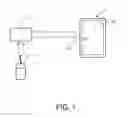
FIG. 1 is a schematic view of hardware arrangement of a handheld computer, a docking station and a mouse of the invention; and
FIG. 2 is a flowchart of the method of the invention.
DETAILED DESCRIPTION OF THE INVENTION
Please refer to FIG. 1. A docking station 1 is connected to a handheld computer 3 such as a smartphone or tablet computer. The connection between the docking station 1 and the handheld computer 3 can be wireless or wired. The wired connection may be the USB (Universal Serial Bus) standard. The wireless connection between the docking station 1 and the handheld computer 3 may be the BLUETOOTH standard. Two BLUETOOTH profiles are used in the wireless connection, namely, the BLUETOOTH-HID (Human Interface Device Profile) and the BLUETOOTH-SPP (Serial Port Profile). An input device, such as a mouse 2 is linked to the docking station 1 through a wired connection, such as the USB (Universal Serial Bus) standard. After the wired and wireless connections have been completed, a cursor 311 will be shown on a display 31 of the handheld computer 3, and the cursor 311 will be moved by the mouse 2 by means of the BLUETOOTH-HID profile.
FIG. 2 shows a flowchart of the invention. In step S1, the mouse 2 is wiredly connected to the docking station 1. In step S2, the handheld computer 3 is connected to the docking station 1. As abovementioned, such a connection can be wired or wireless. In step S3, a cursor 311 is operably shown on the handheld computer 3. As a result, the cursor 311 can be moved by the mouse 2. In step S4, the handheld computer 3 obtains a model name of the mouse 2 through the docking station 1. In detail, the docking station 1 asks the mouse 2 to obtain a model name thereof and then the docking station 1 sends the model name obtained to the handheld computer 3. The data delivery in the wired connection between the docking station 1 and the handheld computer 3 uses the USB path, while the data delivery in the wireless connection between the docking station 1 and the handheld computer 3 uses the BLUETOOTH-SPP (Serial Port Profile) path. In step S5, the handheld computer 3 runs a software application to search internet for specification of the model name of the mouse. In step S6, the application automatically selects a parameter from the internet according to the model name. The steps S5 and S6 are automatically performed by the docking station 1 and the handheld computer 3 without a user's operation. As an example, the parameter may be an integer R between 0 and 10000. In step S7, a numeral value is determined by a formula with the parameter. For example, the formula may be (x·R/100) and (y·R/100), where x and y stand for X-ordinate and Y-ordinate, respectively. After the step S7, the cursor 311 is moved according to the value in step S8. The numeral value is a coefficient of motion of the cursor 311 so as to accelerate or decelerate the motion of the cursor 311.
It will be appreciated by persons skilled in the art that the above embodiment has been described by way of example only and not in any limitative sense, and that various alterations and modifications are possible without departure from the scope of the invention as defined by the appended claims.
Claims
What is claimed is:1. A method for controlling cursor speed, comprising the steps of:
a) wiredly connecting a mouse to the docking station;
b) connecting the docking station to a handheld computer;
c) showing a cursor on the handheld computer;
d) the handheld computer obtaining a model name of the mouse;
e) searching internet for specification of the model name of the mouse;
f) selecting a parameter from the internet according to the model name;
g) determining a numeral value by a formula with the parameter; and
h) moving the cursor according to the numeral value.
2. The method of claim 1, wherein the step a) is implemented by a USB (Universal Serial Bus) standard.
3. The method of claim 1, wherein the step b) is wired performed to form a wireless connection.
4. The method of claim 3, wherein the step b) is wired connection is implemented by a USB standard.
5. The method of claim 1, wherein the step b) is wirelessly performed to form a wired connection.
6. The method of claim 5, wherein the wireless connection is implemented by a BLUETOOTH standard.
7. The method of claim 6, wherein the BLUETOOTH standard further comprises a BLUETOOTH-HID (Human Interface Device) profile and a BLUETOOTH-SPP (Serial Port Profile) profile.
Images & Drawings included:


Sources:
- United States Patent and Trademark Office - verify current appl. status at the USPTO↗
Similar patent applications:
- » 20120235908
Multi-directional remote control system and method with automatic cursor speed control - » 20150301620
METHOD FOR CONTROLLING CURSOR SPEED - » 20150301621
METHOD FOR CONTROLLING CURSOR SPEED - » 20100177041
Method of controlling cursor with multiple and variable speeds through a trackpad - » 20220121295
Mouse for controlling cursor movement speed based on pressure and control method thereof
Recent applications in this class:
- » 20250165085 2025-05-22
INFORMATION PROCESSING APPARATUS FOR CONTROLLING HEAD MOUNTED DISPLAY APPARATUS - » 20250147609 2025-05-08
VIRTUAL PERIPHERALS FOR MOBILE DEVICES - » 20250103152 2025-03-27
WIRELESS COMMUNICATION SYSTEM USING DONGLE TO BUILD UP COMMUNICATION CHANNEL BETWEEN COMPUTERS - » 20250077004 2025-03-06
INFORMATION PROCESSING APPARATUS, BATTERY LEVEL NOTIFICATION METHOD, AND PROGRAM THEREFOR - » 20250068268 2025-02-27
WIRELESS COMMUNICATION SYSTEM HAVING DONGLE AS BRIDGE BETWEEN DIFFERENT COMPUTERS - » 20250053253 2025-02-13
CONTROL METHOD, ELECTRONIC DEVICE AND STYLUS - » 20250044887 2025-02-06
SYSTEM AND METHOD FOR RECOVERY AND COMPENSATION FOR DROPPED OR MISSED DATA PACKETS FOR COMMUNICATION BETWEEN A WIRELESS MOUSE AND A WIRELESS COMMUNICATION DONGLE - » 20250044886 2025-02-06
System and method for wireless input/output (IO) device input data packet payload compression for communication with wireless communication dongle - » 20250036222 2025-01-30
System and method for software application performance-specific data packet communication and polling system for wireless input/output (IO) devices - » 20250028401 2025-01-23
SYSTEMS AND APPARATUS FOR OBJECT DETECTION USING OPTICAL SENSING
Recent applications for this Assignee:
- » 20160239110 2016-08-18
METHOD FOR AUTOMATICALLY TRANSFERRING CONTROL RIGHT OF MOUSE BETWEEN PERSONAL COMPUTER AND HANDHELD COMPUTER - » 20160216953 2016-07-28
METHOD FOR SHOWING AN INSTANT NOTICE ON A DISPLAY OF COMPUTER ACCORDING TO AN INCOMING EVENT OF A MOBILE DEVICE - » 20160216952 2016-07-28
METHOD FOR AUTOMATICALLY FUNCTIONALLY TRANSFERRING INPUT DEVICES OF COMPUTER TO MOBILE DEVICE - » 20160216861 2016-07-28
Method for Changing Touch Control Function for Smartphone and Touchscreen Computer - » 20160216774 2016-07-28
Method for Generating a Cursor on an External Monitor Connected to a Handheld Computer - » 20160048367 2016-02-18
Method for Wirelessly Connecting A Computer To A Monitor For Video Display - » 20160048309 2016-02-18
METHOD FOR AUTOMATICALLY CHANGING DISPLAY VERSION OF WEBSITE - » 20150301621 2015-10-22
METHOD FOR CONTROLLING CURSOR SPEED - » 20150301620 2015-10-22
METHOD FOR CONTROLLING CURSOR SPEED - » 20150105026 2015-04-16
METHOD FOR SHOWING AN INSTANT NOTICE ON A DISPLAY OF COMPUTER ACCORDING TO AN INCOMING EVENT OF A MOBILE DEVICE