Method for launching applications of handheld computer through personal computer
US20160216867A1
2016-07-28
15/049,020
2016-02-20
✅ Patent granted
US 9,959,024 B2
2018-05-01
-
-
Tuan S Nguyen
Locke Lord LLP | Tim Tingkang Xia, Esq.
2036-12-31
Abstract:
A method for launching software applications of a smartphone through a personal computer connected thereto is disclosed. The method includes the steps of: a) operatably connecting the handheld computer to the personal computer; b) the personal computer acquiring information of used times of applications of the handheld computer; c) converting tops of the most frequently used applications into items in a subwindow of the personal computer; and d) launching one of the applications by clicking an item in the subwindow, wherein the clicked item corresponds to the launched application.
Inventors:
- Johnny Chen 108 🇹🇼 Taipei, Taiwan
- Johnny Chen 13 🇹🇼 Taipei City, Taiwan
- Gary Kung 6 🇹🇼 Taipei City, Taiwan
- Gary Kung 2 🇹🇼 Taipei, Taiwan
Assignee:
- I/O INTERCONNECT, LTD. 43 🇺🇸 Santa Ana, CA, United States
Applicant:
Interested in similar patents?
Get notified when new applications in this technology area are published.
Classification:
G06F3/04842 » CPC main
Input arrangements for transferring data to be processed into a form capable of being handled by the computer; Output arrangements for transferring data from processing unit to output unit, e.g. interface arrangements; Input arrangements or combined input and output arrangements for interaction between user and computer; Interaction techniques based on graphical user interfaces [GUI] for the control of specific functions or operations, e.g. selecting or manipulating an object, an image or a displayed text element, setting a parameter value or selecting a range Selection of displayed objects or displayed text elements
G06F3/14 IPC
Input arrangements for transferring data to be processed into a form capable of being handled by the computer; Output arrangements for transferring data from processing unit to output unit, e.g. interface arrangements Digital output to display device ; Cooperation and interconnection of the display device with other functional units
G06F3/1454 » CPC further
Input arrangements for transferring data to be processed into a form capable of being handled by the computer; Output arrangements for transferring data from processing unit to output unit, e.g. interface arrangements; Digital output to display device ; Cooperation and interconnection of the display device with other functional units involving copying of the display data of a local workstation or window to a remote workstation or window so that an actual copy of the data is displayed simultaneously on two or more displays, e.g. teledisplay
G06F13/42 IPC
Interconnection of, or transfer of information or other signals between, memories, input/output devices or central processing units; Information transfer, e.g. on bus Bus transfer protocol, e.g. handshake; Synchronisation
G06F13/387 » CPC further
Interconnection of, or transfer of information or other signals between, memories, input/output devices or central processing units; Information transfer, e.g. on bus using universal interface adapter for adaptation of different data processing systems to different peripheral devices, e.g. protocol converters for incompatible systems, open system
G06F13/4282 » CPC further
Interconnection of, or transfer of information or other signals between, memories, input/output devices or central processing units; Information transfer, e.g. on bus; Bus transfer protocol, e.g. handshake; Synchronisation on a serial bus, e.g. I2C bus, SPI bus
G06F3/0481 » CPC further
Input arrangements for transferring data to be processed into a form capable of being handled by the computer; Output arrangements for transferring data from processing unit to output unit, e.g. interface arrangements; Input arrangements or combined input and output arrangements for interaction between user and computer; Interaction techniques based on graphical user interfaces [GUI] based on specific properties of the displayed interaction object or a metaphor-based environment, e.g. interaction with desktop elements like windows or icons, or assisted by a cursor's changing behaviour or appearance
G06F9/445 » CPC further
Arrangements for program control, e.g. control units using stored programs, i.e. using an internal store of processing equipment to receive or retain programs; Arrangements for executing specific programs Program loading or initiating
G06F13/38 IPC
Interconnection of, or transfer of information or other signals between, memories, input/output devices or central processing units Information transfer, e.g. on bus
G06F3/0482 » CPC further
Input arrangements for transferring data to be processed into a form capable of being handled by the computer; Output arrangements for transferring data from processing unit to output unit, e.g. interface arrangements; Input arrangements or combined input and output arrangements for interaction between user and computer; Interaction techniques based on graphical user interfaces [GUI] based on specific properties of the displayed interaction object or a metaphor-based environment, e.g. interaction with desktop elements like windows or icons, or assisted by a cursor's changing behaviour or appearance Interaction with lists of selectable items, e.g. menus
G06F3/04817 » CPC further
Input arrangements for transferring data to be processed into a form capable of being handled by the computer; Output arrangements for transferring data from processing unit to output unit, e.g. interface arrangements; Input arrangements or combined input and output arrangements for interaction between user and computer; Interaction techniques based on graphical user interfaces [GUI] based on specific properties of the displayed interaction object or a metaphor-based environment, e.g. interaction with desktop elements like windows or icons, or assisted by a cursor's changing behaviour or appearance using icons
G06F9/451 » CPC further
Arrangements for program control, e.g. control units using stored programs, i.e. using an internal store of processing equipment to receive or retain programs; Arrangements for executing specific programs Execution arrangements for user interfaces
G06F3/0484 IPC
Input arrangements for transferring data to be processed into a form capable of being handled by the computer; Output arrangements for transferring data from processing unit to output unit, e.g. interface arrangements; Input arrangements or combined input and output arrangements for interaction between user and computer; Interaction techniques based on graphical user interfaces [GUI] for the control of specific functions or operations, e.g. selecting or manipulating an object, an image or a displayed text element, setting a parameter value or selecting a range
Description
CROSS-REFERENCE TO RELATED APPLICATIONS
This application is a continuation-in-part of U.S. patent application Ser. No. 14/607,046, filed Jan. 27, 2015, now pending.
BACKGROUND OF THE INVENTION
1. Technical Field
The invention relates to combination of a personal computer and a handheld computer such as a smartphone or tablet, particularly to integration of operation of applications of a handheld computer through a personal computer.
2. Related Art
Handheld computers, such as smartphones and tablets, have become essential for most people. Users of handheld computers have the need to connect their handheld computers to an external personal computer such as a desktop or a laptop computer which serves as a second computer. Some specific applications can open a subwindow within a screen picture on the display of the external personal computer to show a screen picture of the handheld computer on the personal computer when the handheld computer has been connected to the personal computer. Of course, the screen picture of the subwindow is the same as that of the handheld computer, for example, the items which separately stand for various software applications and are shown on the handheld computer.
By means of such specific software applications, although a user can launch a software application of a handheld computer by clicking a corresponding item in the subwindow of the personal computer, the contents of the subwindow is always the same as the handheld computer and no frequently used software applications can be shown on the personal computer. That is a fly in the ointment for users who always or usually connect their handheld computers to a personal computer because they cannot directly and quickly launch their frequently used software applications by clicking an item in the subwindow. However, there is no solution on the market yet.
SUMMARY OF THE INVENTION
An object of the invention is to provide a method for launching applications of a handheld computer through a personal computer, which can automatically generate a list of the most frequently used software applications and show the list on the personal computer connected thereto. Thus a user can directly and quickly launch one of the most frequently used software applications by clicking an item in the list shown on the personal computer.
To accomplish the above said object, the method for launching applications of a handheld computer through a personal computer of the invention includes the steps of:
a) operatably connecting the handheld computer to the personal computer;
b) the personal computer acquiring information of used times of applications of the handheld computer;
c) converting tops of the most frequently used applications into items in a subwindow of the personal computer; and
d) launching one of the applications by clicking an item in the subwindow, wherein the clicked item corresponds to the launched application.
BRIEF DESCRIPTION OF THE DRAWINGS
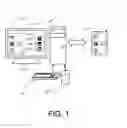
FIG. 1 is a schematic view of hardware arrangement of the invention;
FIG. 2 is a flowchart of the method of the invention; and
FIG. 3 is a schematic view showing an item in the shortcut subwindow is clicked to launch a software application of the handheld computer.
DETAILED DESCRIPTION OF THE INVENTION
Please refer to FIG. 1. The invention provides a method for launching software applications of a handheld computer 1 through a personal computer 2.
The handheld computer 1 may be based upon an Android operating system. The personal computer 2 may be a desktop or laptop computer based upon a Windows operating system. Of course, the handheld computer 1 and the personal computer 2 must be provided with a first display 11 and a second display 21, respectively. Additionally, the personal computer is provided with a mouse 22 and a keyboard 23. There must be a cursor 213 shown on the second display 21.
Please refer to FIG. 2, which shows a flowchart of the method of the invention. In step S 1, the handheld computer 1 is operatably connected to the personal computer 2. The connection between the handheld computer 1 and the personal computer 2 may be wired or wireless. Such a wired connection may be implemented by a USB (universal serial bus) cable (not shown). In detail, an AOA (Android Open Accessory) protocol is performed between the handheld computer 1 and the personal computer 2 through the USB cable. A wireless connection between the handheld computer 1 and the personal computer 2 may be implemented by a BLUETOOTH or Wi-Fi communication protocol. A screen picture of the handheld computer 1 is projected on the second display 21 of the personal computer 2 in a handheld computer subwindow 211. The personal computer 2 still keeps working independently. Of course, all contents including items, pictures and their relative position of the handheld computer subwindow 211 are the same as the handheld computer 1. Additionally, both the handheld computer 1 and the personal computer 2 are separately installed with proprietary software applications. Then a communication channel is created between the handheld computer 1 and the personal computer 2.
In step S2, the proprietary software application in the personal computer 2 acquires information of used times of software applications of the handheld computer 1 through the proprietary soft application in the handheld computer 1.
In step S3, according to the information acquired in step S2, the personal computer 2 converts the tops of the most frequently used applications into items 212a, 212b and 212c in a shortcut subwindow 212 of the second display 21 of the personal computer 2. In other words, the tops of the most frequently used applications of the handheld computer 1 are shown in the shortcut subwindow 212. As a result, a user can directly view the most frequently used applications of the handheld computer 1 on the second display 21 of the personal computer 2.
Finally, in step S4, the handheld computer 1 launches one of the applications by using the cursor 213 to click an item 212a, 212b or 212c in the shortcut subwindow 212, wherein the clicked item 212c corresponds to the launched application as shown in FIG. 3. Meantime, the handheld computer subwindow 211 is still shown on the second display 21 of the personal computer 2.
In sum, by the method of the invention, the most frequently used applications of the handheld computer 1 can be the shown on a shortcut subwindow 212 of the personal computer 2 and can be launched by clicking the items in the shortcut subwindow 212. This will be very helpful for those users who connect their handheld computers to a personal computer.
It will be appreciated by persons skilled in the art that the above embodiment has been described by way of example only and not in any limitative sense, and that various alterations and modifications are possible without departure from the scope of the invention as defined by the appended claims.
Claims
What is claimed is:1. A method for launching applications of a handheld computer through a personal computer, comprising:
a) operatably connecting the handheld computer to the personal computer;
b) the personal computer acquiring information of used times of applications of the handheld computer;
c) converting tops of the most frequently used applications into items in a subwindow of the personal computer; and
d) launching one of the applications by clicking an item in the subwindow, wherein the clicked item corresponds to the launched application.
2. The method of claim 1, wherein a connection between the handheld computer and the personal computer is a wired link.
3. The method of claim 2, wherein the wired link is a USB (universal serial bus) cable.
4. The method of claim 3, wherein an AOA (Android Open Accessory) protocol is performed between the handheld computer and the Windows personal computer through the USB cable.
5. The method of claim 1, wherein a connection between the handheld computer and the personal computer is a wireless link.
6. The method of claim 5, wherein the wireless connection is a BLUETOOTH or Wi-Fi communication protocol.
Images & Drawings included:



Sources:
- United States Patent and Trademark Office - verify current appl. status at the USPTO↗
Recent applications in this class:
- » 20250291467 2025-09-18
Video Processing Method and Electronic Device - » 20250284382 2025-09-11
ON-SCREEN, SPLIT VIRTUAL KEYBOARDS - » 20250278180 2025-09-04
System and Method For Integrating Selectable Inputs With Real-Time Data Pipelines To Execute Actions - » 20250278179 2025-09-04
INFORMATION SELECTION IN TABLE WITH GENERATED WINDOW - » 20250264985 2025-08-21
ELECTRONIC DEVICE FOR FACILITATING USER INTERACTIONS WITH GRAPHICAL OBJECTS PRESENTED ON A DISPLAY - » 20250258593 2025-08-14
AUTOMATICALLY ORGANIZING CONTENT COLLECTIONS WITH SMART CONTENT SYNTHESIS AND DYNAMIC FACETS - » 20250258592 2025-08-14
PRESENTING EVENTS BASED ON USER-SELECTED FIELDS - » 20250258591 2025-08-14
MEDIA LIBRARY USER INTERFACES - » 20250258590 2025-08-14
CONTENT COLLECTION INDICATORS WITHIN A GROUP MESSAGING SYSTEM - » 20250251852 2025-08-07
AVATAR CUSTOMIZATION SYSTEM
Recent applications for this Assignee:
- » 20190289442 2019-09-19
Wireless connecting method, backup device, and non-transitory backup device-readable storage medium - » 20180189197 2018-07-05
Keyboard-video-mouse switch, and signal transmitting method - » 20180101496 2018-04-12
Human interface device switch with security function - » 20180018295 2018-01-18
METHOD FOR AUTOMATICALLY EXCHANGING DEVICE-TO-HOST INTERFACE DIRECTION FOR USB TYPE-C CONNECTIONS - » 20170366923 2017-12-21
Method for making a host personal computer act as an accessory in bluetooth piconet - » 20170346312 2017-11-30
METHOD FOR MANAGING CHARGING PROCESS TO PORTABLE COMPUTERS - » 20170344507 2017-11-30
Method for managing docking device and docking device - » 20170337148 2017-11-23
Method for Synchronizing Touch Control Functions for Smartphone and Tablet Computer - » 20170270893 2017-09-21
Method for Divisionally Displaying Screen Pictures of Multiple Web Browser Pages of Handheld Computer on External Monitor - » 20170270205 2017-09-21
Method for Divisionally Displaying Search Engine Results Page and Web Pages Therefrom