Tap to Add Photo to Object in Augmented Reality
US20190371068A1
2019-12-05
16/292,362
2019-03-05
Abstract:
The ‘Tap to Add Photo to Object in Augmented Reality’ invention allows smartphone application users to upload photos from their smartphone onto an object in augmented reality. The user taps on the screen of the smartphone directly over the object in the augmented reality view. The tap gesture switches the view to the smartphone's photo library. Once a photo is chosen, the smartphone view changes back to the augmented reality view with the chosen photo displayed.
Interested in similar patents?
Get notified when new applications in this technology area are published.
Classification:
G06T19/006 » CPC main
Manipulating 3D models or images for computer graphics Mixed reality
G06F3/04845 » CPC further
Input arrangements for transferring data to be processed into a form capable of being handled by the computer; Output arrangements for transferring data from processing unit to output unit, e.g. interface arrangements; Input arrangements or combined input and output arrangements for interaction between user and computer; Interaction techniques based on graphical user interfaces [GUI] for the control of specific functions or operations, e.g. selecting or manipulating an object, an image or a displayed text element, setting a parameter value or selecting a range for image manipulation, e.g. dragging, rotation, expansion or change of colour
G06F3/04883 » CPC further
Input arrangements for transferring data to be processed into a form capable of being handled by the computer; Output arrangements for transferring data from processing unit to output unit, e.g. interface arrangements; Input arrangements or combined input and output arrangements for interaction between user and computer; Interaction techniques based on graphical user interfaces [GUI] using specific features provided by the input device, e.g. functions controlled by the rotation of a mouse with dual sensing arrangements, or of the nature of the input device, e.g. tap gestures based on pressure sensed by a digitiser using a touch-screen or digitiser, e.g. input of commands through traced gestures for inputting data by handwriting, e.g. gesture or text
G06F16/5866 » CPC further
Information retrieval; Database structures therefor; File system structures therefor of still image data; Retrieval characterised by using metadata, e.g. metadata not derived from the content or metadata generated manually using information manually generated, e.g. tags, keywords, comments, manually generated location and time information
G06T19/00 IPC
Manipulating 3D models or images for computer graphics
G06F3/0484 IPC
Input arrangements for transferring data to be processed into a form capable of being handled by the computer; Output arrangements for transferring data from processing unit to output unit, e.g. interface arrangements; Input arrangements or combined input and output arrangements for interaction between user and computer; Interaction techniques based on graphical user interfaces [GUI] for the control of specific functions or operations, e.g. selecting or manipulating an object, an image or a displayed text element, setting a parameter value or selecting a range
G06F3/0482 » CPC further
Input arrangements for transferring data to be processed into a form capable of being handled by the computer; Output arrangements for transferring data from processing unit to output unit, e.g. interface arrangements; Input arrangements or combined input and output arrangements for interaction between user and computer; Interaction techniques based on graphical user interfaces [GUI] based on specific properties of the displayed interaction object or a metaphor-based environment, e.g. interaction with desktop elements like windows or icons, or assisted by a cursor's changing behaviour or appearance Interaction with lists of selectable items, e.g. menus
G06F3/0488 IPC
Input arrangements for transferring data to be processed into a form capable of being handled by the computer; Output arrangements for transferring data from processing unit to output unit, e.g. interface arrangements; Input arrangements or combined input and output arrangements for interaction between user and computer; Interaction techniques based on graphical user interfaces [GUI] using specific features provided by the input device, e.g. functions controlled by the rotation of a mouse with dual sensing arrangements, or of the nature of the input device, e.g. tap gestures based on pressure sensed by a digitiser using a touch-screen or digitiser, e.g. input of commands through traced gestures
G06F16/58 IPC
Information retrieval; Database structures therefor; File system structures therefor of still image data Retrieval characterised by using metadata, e.g. metadata not derived from the content or metadata generated manually
G06F16/54 » CPC further
Information retrieval; Database structures therefor; File system structures therefor of still image data Browsing; Visualisation therefor
Description
CROSS-REFERENCE TO RELATED APPLICATIONS
The ‘Tap to Add Photo in Augmented Reality’ invention is referenced in the Provisional Utility Patent Application No.: 62/679,773.
BACKGROUND OF THE INVENTION
The initial use of the ‘Tap to Add Photo to Object in Augmented Reality’ invention is demonstrated in the iOS Application Listing AR which is published in the iOS AppStore. Listing AR is an iOS application that allows users to create real estate listings to be viewed in Augmented Reality. The ‘Tap to Add Photo to Object in Augmented Reality’ invention can also be used in social media applications where the user wishes to upload a photo from their smartphones ‘Photo Library’ and onto an object in the augmented reality view.
BRIEF SUMMARY OF THE INVENTION
The tap to add photo to object in augmented reality allows users to upload photos to objects viewed in Augmented Reality. Problems prior to the existence of the ‘Tap to Add Photo to Object in Augmented Reality’ invention were that users wishing to create real estate listings were limited to uploading photos to be viewed individually rather than part of a model. Prior to this invention, users had to contact a realtor and meet in-person in order to walk through a house. With the ‘Tap to Add Photo to Object in Augmented Reality’ invention, users are now able to walk through several real estate listings in one day without having to leave their current location. The invention of the ‘360 view’ used by real estate applications is also limited in the capabilities of the ‘Tap to Add Photo To Object in Augmented Reality’ invention by being limited to stationary y and z coordinates and only being able to move about the x-axis. The ‘Tap to Add Photo To Object in Augmented Reality’ invention is capable of moving freely through the Augmented Reality view to include x, y, and z directions as demonstrated in augmented reality applications.
BRIEF DESCRIPTION OF DRAWINGS
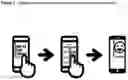
FIG. 1. In the top left image, the user taps on the screen of the smartphone directly over the object where the photo will display. In the middle image, the photo from the user's ‘photo library’ on their smartphone is selected. In the right image, the photo is displayed on the object in the augmented reality view.
FIG. 2. (Below) FIG. 2 demonstrates how to use the “Tap to Add Photo to Object in Augmented Reality” invention. In the top left image, the user taps on the screen over the object. In the top middle image, the user selects the photo of a kitchen to be displayed on the object. In the top right image, the photo is displayed on the image. Also, the user taps on a second object. In the bottom right image, the user selects a second photo of a wooden floor. In the bottom left image, the second photo of a wooden floor is displayed as a hardwood floor in the augmented reality view.
DETAILED DESCRIPTION OF THE INVENTION
The ‘Tap to Add Photo to Object in Augmented Reality’ invention is designed to be used in augmented reality applications where the user wishes to upload photos to be rendered onto an object or plane in the augmented reality field of view. A script, the ChangeTexture.cs script, is called when a user taps the screen of a smartphone over the object or prefab model containing the texture and ChangeTexture.cs script. The ‘Tap Gesture’ initiates the smartphone to transition to the ‘Photo Library’ contained within each user's smartphone. Once a photo is selected from the ‘Photo Library’, the screen immediately transitions back to the augmented reality application. At this point, the chosen photo from the ‘Photo Library’ is now rendered onto the object or plane that was tapped on and contains the texture and ChangeTexture.cs script as published within the Listing AR iOS Application.
The Augmented Reality view is rendered by referencing the Main Camera from the UnityARCameraManager.cs script and ARCameraManager Game Object as published within the Listing AR iOS Application. The ‘Tap to Add Photo in Augmented Reality’ invention uses the C♯ (C Sharp) programming language in Unity 3D. The libraries used to access the functionality of the script are: System.Collections, System.Collections.Generic and UnityEngine. Photographs are rendered onto a texture attached to an object. Prior inventions have been used in Virtual Reality applications but never capable of performing the same capabilities in Augmented Reality.
Claims
1. The ‘Tap to Add Photo to Object in Augmented Reality’ invention is capable of uploading photographs from your smartphone to be displayed on an object within an Augmented Reality view.
2. The ‘Tap to Add Photo to Object in Augmented Reality’ invention is capable of uploading photographs from your smartphone to be rendered onto prefab models of apartments, houses, condos and office buildings and displayed in an Augmented Reality view.
3. The ‘Tap to Add Photo to Object in Augmented Reality’ invention is capable of uploading photographs from your smartphone to be rendered onto prefab models as well as objects to be displayed in an Augmented Reality view.
Images & Drawings included:


Sources:
- United States Patent and Trademark Office - verify current appl. status at the USPTO↗
Recent applications in this class:
- » 20250173985 2025-05-29
SIDE-BY-SIDE CHARACTER ANIMATION FROM REALTIME 3D BODY MOTION CAPTURE - » 20250173984 2025-05-29
SYSTEMS AND METHODS FOR USING ARTIFICIAL INTELLIGENCE WITH ASSISTIVE BOTS IN EXTENDED REALITY ENVIRONMENTS - » 20250173983 2025-05-29
HANDCRAFTED AUGMENTED REALITY EXPERIENCES - » 20250173982 2025-05-29
Method for Operating a Server-Based Master Database for a Multi-User Collaborative Augmented Reality System - » 20250173981 2025-05-29
SYSTEMS AND METHODS FOR ARTIFICIAL INTELLIGENCE-BASED VIRTUAL AND AUGMENTED REALITY - » 20250173980 2025-05-29
Synchronized, Interactive Augmented Reality Displays for Multifunction Devices - » 20250173979 2025-05-29
Devices, Methods, and Graphical User Interfaces for Interacting with Three-Dimensional Environments - » 20250173978 2025-05-29
Real-time Rendering Of Animated Objects - » 20250173977 2025-05-29
WEARABLE DEVICE FOR PROVIDING VIRTUAL OBJECT GUIDING SHOOTING OF IMAGE OR VIDEO AND METHOD THEREOF - » 20250173976 2025-05-29
INSPECTION SYSTEM AND INSPECTION METHOD OF BUILDING STRUCTURES BY USING AUGMENTED REALITY BASED ON BUILDING INFORMATION MODELING