Editor's pen pad
US20220100289A1
2022-03-31
17/035,535
2020-09-28
✅ Patent granted
US 11,379,056 B2
2022-07-05
-
-
Daeho D Song
2040-09-28
Abstract:
The present invention specifically relates to a device for professionally editing books from various writing genres. Receiving, storing, and professionally editing documents for publishing. Wherein the device includes integrated computer processing components. Historically, the stylus was used by Romans in 1300 BC to write on wax tablets, as a means of record; technology has completely transformed the way we presently use writing instruments. This invention pertains to a device that receives information via an electronic pen, which houses a CPU with pre-installed professional editing software, an accompanying smart pad with instant scanning capabilities, with Wi-Fi compatibility. An integral part of the present integrative invention is the Beacon Charger, docking station with hard drive. Finally, an electronic pen to offer advanced professional editing for all authors . . . Welcome to the future of editing.
Applicant:
Interested in similar patents?
Get notified when new applications in this technology area are published.
Classification:
G06F3/03545 » CPC main
Input arrangements for transferring data to be processed into a form capable of being handled by the computer; Output arrangements for transferring data from processing unit to output unit, e.g. interface arrangements; Input arrangements or combined input and output arrangements for interaction between user and computer; Arrangements for converting the position or the displacement of a member into a coded form; Pointing devices displaced or positioned by the user, e.g. mice, trackballs, pens or joysticks ; Accessories therefor with detection of 2D relative movements between the device, or an operating part thereof, and a plane or surface, e.g. 2D mice, trackballs, pens or pucks Pens or stylus
H02J7/0044 » CPC further
Circuit arrangements for charging or depolarising batteries or for supplying loads from batteries characterised by the mechanical construction specially adapted for holding portable devices containing batteries
G06F3/0354 IPC
Input arrangements for transferring data to be processed into a form capable of being handled by the computer; Output arrangements for transferring data from processing unit to output unit, e.g. interface arrangements; Input arrangements or combined input and output arrangements for interaction between user and computer; Arrangements for converting the position or the displacement of a member into a coded form; Pointing devices displaced or positioned by the user, e.g. mice, trackballs, pens or joysticks ; Accessories therefor with detection of 2D relative movements between the device, or an operating part thereof, and a plane or surface, e.g. 2D mice, trackballs, pens or pucks
G06F3/0488 IPC
Input arrangements for transferring data to be processed into a form capable of being handled by the computer; Output arrangements for transferring data from processing unit to output unit, e.g. interface arrangements; Input arrangements or combined input and output arrangements for interaction between user and computer; Interaction techniques based on graphical user interfaces [GUI] using specific features provided by the input device, e.g. functions controlled by the rotation of a mouse with dual sensing arrangements, or of the nature of the input device, e.g. tap gestures based on pressure sensed by a digitiser using a touch-screen or digitiser, e.g. input of commands through traced gestures
G06F3/04883 » CPC further
Input arrangements for transferring data to be processed into a form capable of being handled by the computer; Output arrangements for transferring data from processing unit to output unit, e.g. interface arrangements; Input arrangements or combined input and output arrangements for interaction between user and computer; Interaction techniques based on graphical user interfaces [GUI] using specific features provided by the input device, e.g. functions controlled by the rotation of a mouse with dual sensing arrangements, or of the nature of the input device, e.g. tap gestures based on pressure sensed by a digitiser using a touch-screen or digitiser, e.g. input of commands through traced gestures for inputting data by handwriting, e.g. gesture or text
H02J7/00 IPC
Circuit arrangements for charging or depolarising batteries or for supplying loads from batteries
Description
BACKGROUND
The present invention pertains to the sector of articles for the author's use.
More specifically, the present invention pertains to an electronic editing writing device.
Various devices are known for digital writing with accompanying tablets, however the present invention differs, in its advancement; this invention skillfully edits the manuscripts and varied writing documents via the electronic smart pen which skillfully houses professional editing software, with a direct link for publishing submission.
The present invention pertains to an editing writing device. Across various technical, legal and business fields it is necessary to precisely draft a written or printed document for effective communication, to responsibly disseminate information, for profitable enterprise, etc. As well, it is the desired goal of the author to prepare the written work for publication.
SUMMARY OF INVENTION
This present invention is a device to professionally edit the author's written documents; manuscripts, news articles, dissertations, etc.
DRAWINGS DESCRIPTION
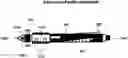
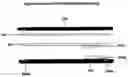
FIG. 1 Editor's Pen Pad/Pen Description
- 1. 100 Editor's Pen
- 2. 101A Pen Shaft/Charge and Sync Connector
- 3. 101B Pen Charging Port(s)
- 4. 100B Pen Record Button
- 5. 100C Pen Microphone
- 6. 100D Pen Nib
- 7. 100E Pen Nib/Micro-Scanner Side Left (works in conjunction with 100F)
- 8. 100F Pen Nib/Micro-Scanner Side Right (works in conjunction with 100E)
- 9. 102 Pen Nib Base
- 10. 102A Pen Nib and Base Connective Bar
- 11. 103 Pen Nib Attachment
- 12. 104 Pen Cooling Vent
Drawings Description
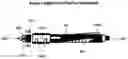
FIG. 2 Editor's Smart Pen (Internal View) Description
- 1. 100 Editor's Pen Upper and Lower Part(s)
- 2. 100A Editor's Pen Record Button
- 3. 100B Editor's Pen Memory Storage
- 4. 100C Editor's Pen Professional Editing Software
- 5. 100D Editor's Pen CPU Panel
- 6. 100E Editor's Pen Rechargeable Battery
- 7. 101 Editor's Pen Microphone
- 8. 001A Editor's Pen Microphone Cover Part A
- 9. 001B Editor's Pen Microphone Cover Part B
- 10. 001C Editor's Pen Microphone Base
- 11. 002 Editor's Pen Input Sync Port (professional editing software and downloads)
- 12. 002A Editor's Pen Battery Charging Port(s)
- 13. 003 Editor's Pen Shaft (Upper Part of Input Sync Port)
- 14. 003A Editor's Pen Shaft (Lower Part of Input Sync Port)
- 15. 004 Editor's Pen Nib/Micro-Scanner Side Left
- 16. 004A Editor's Pen Nib/Micro-Scanner Side Right
- 17. 005 Editor's Pen Nib
- 18. 102 Editor's Pen Nib Base
- 19. 102A Editor's Pen Nib and Base Connective Bar
Drawings Description
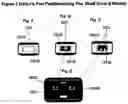
FIG. 3 Editor's Pen Pad/Pen Revolving Pen Shaft (How It Works)
Fig. A
- 1. 001 Editor's Pen Pad/Pen Shaft Cover
- 2. 001A Editor's Pen Pad/Pen Shaft
- 3. 001B Editor's Pen Pad/Pen Shaft Revolving Mechanism
Fig. B
- 1. 002 Editor's Pen Pad Input Sync Port (Professional Editing and Downloads)
- 2. 001A Editor's Pen Pad/Pen Shaft
- 3. 001B Editor's Pen Pad/Pen Shaft Revolving Mechanism
Fig. C
- 1. 003 Editor's Pen Pad Charging Port
- 2. 001A Editor's Pen Pad/Pen Shaft
- 3. 001B Editor's Pen Pad/Pen Shaft Revolving Mechanism
Fig. D
- 1. 004 Editor's Pen Pad Beacon Charger
- 2. 004A Editor's Pen Pad Beacon Charger Pen Shaft Connection (Fig. B No. 1)
- 3. 004B Editor's Pen Pad Beacon Charging Port Connection (Fig. C No. 1)
Drawings Description
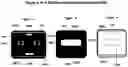
FIG. 1A Description Editor's Pen Pad Beacon Charger Description (Overhead View)
- 1. 100 Editor's Smart Pen Beacon Charger
- 2. 100A Editor's Pen Status Bar
- 3. 100 B Beacon Charger Power Button
- 4. 100C Editor's Pen Input Sync Port for Professional Editing and Downloads
- 5. 100 D Beacon Charging Port
- 6. 100 E1 (Left) Beacon Charger Cover Track
- 7. 100E2 (Right) Beacon Charger Cover Track
- 8. 100 F1 Beacon Charger Cover Stop (Right)
- 9. 100 F2 Beacon Charger Cover Stop (Left)
- 10. 101 Beacon Charger Cover Release Button
FIG. 1B Description Editor's Smart Beacon Charger Description (Overhead/Cover View)
- 1. 103 Beacon Charger Cover
- 2. 103 A Beacon Charger Cover Logo (Illuminated)
- 3. 100 E1 Beacon Charger Cover (Right Underside)
- 4. 100 E2 Beacon Charger Cover (Left Underside)
FIG. 1C Description Editor's Smart Beacon Charger Description (Underside Cover View)
- 1. 103 Beacon Charger Cover
- 2. 100 E1 Beacon Charger Cover Track (Right)
- 3. 100 E2 Beacon Charger Cover Track (Left)
- 4. 103 B Beacon Charger Logo (Illuminated) Mechanism Panel
- 5. 103 C Beacon Charger Cover Stop Bar
Drawings Description
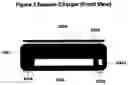
FIG. 2 Beacon Charger Description (Front View)
- 1. 100 Beacon Charger
- 2. 100A Beacon Charger Cover
- 3. 100B Beacon Charger Cover Track(s)
- 4. 100C Beacon Charger Speaker
- 5. 100D Beacon Charger Volume Button
- 6. 101A Beacon Charger Pod (Left)
- 7. 101B Beacon Charger Pod (Right)
Drawings Description
FIG. 3 Beacon Charger Description (Left Side View)
- 1. 100 Beacon Charger
- 2. 100 A Beacon Charger Power Button
- 3. 100B Beacon Charger Connector Plug for Pad
- 4. 100 C Beacon Charger USB Port (i.e., Exclusive for external drives)
- 5. 100 D Beacon Charger Hard Drive/Cooling Fan
- 6. 100E Beacon Charger Cover
- 7. 101 A Beacon Charger Track (Left side)
- 8. 101 B Beacon Charger Track (Right side)
- 9. 102 A Beacon Charger Pod (Left side)
- 10. 102 B Beacon Charger Pod (Right side)
Drawings Description
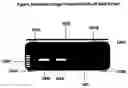
FIG. 4 Beacon Charger Description (Back View)
- 1. 100 Beacon Charger
- 2. 100 A Beacon Charger Cover Release Button
- 3. 100 B Beacon Charger Cover Door
- 4. 100 C Beacon Charger Track
- 5. 100 D Beacon Charger USB Power Cord/Port
- 6. 100 E Beacon Charger Hard Drive/Cooling Fan
- 7. 101 Beacon Charger Hard Drive Vent(s)
- 8. 101 A Beacon Charger Pod (Left side)
- 9. 101B Beacon Charger Pod (Right side)
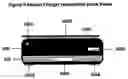
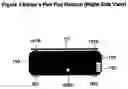
FIG. 5 Editor's Pen Pad Beacon (Right Side View)
- 1. 100 Editor's Pen Pad Beacon
- 2. 100A Editor's Pen Pad Beacon Headphone Port
- 3. 101 Editor's Pen Pad Beacon Cover
- 4. 101A Editor's Pen Pad Beacon Cover Track
- 5. 101B Editor's Pen Pad Beacon Cover Track
- 6. 102 Editor's Pen Pad Beacon Cooling Vent
- 7. 103 Editor's Pen Pad Beacon Cover Release Button
- 8. 001 Editor's Pen Pad Beacon Pod A
- 9. 002 Editor's Pen Pad Beacon Pod B
Drawings Description
FIG. 6 Beacon Charger Description (Internal View)
- 1. 100 Beacon Charger (Top Part)
- 2. 100A Beacon Charger Cover Track
- 3. 100B Beacon Charger Cover
- 4. 101 Beacon Charger Base for Hard Drive and CPU Panel
- 5. 101A Beacon Micro Chip Panel
- 6. 101B Hard Drive
- 7. 102 Beacon Charger Cooling Fan
- 8. 102A Beacon Charger Sync
- 9. 102B Beacon Charger Port
- 10. 103 Beacon Charger Operation Connection Wires
- 11. 104 Beacon Charger (Bottom Part)
- 12. 104A Beacon Charger Speakers
- 13. 105 Beacon Charger Pods A and B
Drawings Description
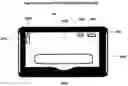
FIG. 1 The Editor's Pen Pad/Pad Description
- 1. 100 The Editor's Pen Pad/Pad
- 2. 100A The Editor's Pen Pad Digital Keyboard (Power Activated)
- 3. 100E The Editor's Pen Pad Wi-Fi Status Bar (Power Activated)
- 4. 100C The Editor's Pen Pad Word Count View (Power Activated)
- 5. 100D The Editor's Pen Pad Volume Level When You Speak In To The Pen (Power Activated)
- 6. 100E The Editor's Pen Pad Screen To Write On
- 7. 101 The Editor's Pen Pad USB Power Cord Port
- 8. 102A The Editor's Pen Pad Scan/Input Feed
- 9. 102B The Editor's Pen Pad Scan/Output Feed
Drawings Description
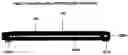
FIG. 2 The Editor's Pen Pad/Pad (Right Side View)
- 1. 100 The Editor's Pen Pad/Pad
- 2. 100A The Editor's Pen Pad/Pad Scan/Input Feed
- 3. 100B The Editor's Pen Pad/Pad USB Power Cord Port
- 4. 101 The Editor's Pen Pad/Pad Screen
- 5. 102A The Editor's Pen Pad/Pad Pod A
- 6. 102B The Editor's Pen Pad/Pad Pod B
Drawings Description
FIG. 3 The Editor's Pen Pad/Pad (Internal View)
- 1. 100 The Editor's Pen Pad (Top Part)
- 2. 101 The Editor's Pen Pad Scanning Panel
- 3. 102 The Editor's Pen Pad Input/output Feed Base
- 4. 102A The Editor's Pen Pad Cooling Fan
- 5. 103 The Editor's Pen Pad (Bottom Part)
- 6. 103A The Editor's Pen Pad Hard Drive and CPU Panel
- 7. 104A The Editor's Pen Pad Pod A and B
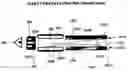
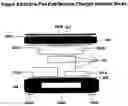
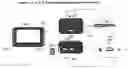
FIG. 1 DRAWINGS BRIEF DESCRIPTION A, B, C, D, E, F, THE EDITOR'S PEN PAD (CONNECTION)
Figure A The Editor's Pen
- 1. Letter A/Beacon Charger Syncing Port Connects to Figure B into Letter A activates professional editing software
- 2. Letter B/Beacon Charger Port Connects to Figure B into Letter B activates battery charging
Figure B Beacon Charger (The Overhead View)
- 1. Letter A/Beacon Charger Syncing Port Connects to Figure A into Letter A activates professional editing software
- 2. Letter B/Beacon Charger Port Connects to Figure A into Letter B activates battery charging
- 3. 103 Beacon Charger Headphone Port
- 4. 103A Headphones Connects to the Beacon Charger
- 5. 103B Beacon Charger Power Button
Figure C The Editor's Pen Pad Beacon Charger (Left Side View)
- 1. 100A Beacon Charger USB Port Connects to Figure D into 100 to power on pad
- 2. 100B USB External Drive Port/Document Retrieval and Sync
- 3. 100C Beacon Charger USB Power Cord/Port allow the Beacon and Pad to power on
Figure D The Editor's Pen Pad/Pad (Overhead View)
- 1. 100 USB Port for the Beacon Charger Attachment (100 to Figure 100A Connection) to power on
- 2. 102A The Pad Scan/Input Feed to receive document for scan
- 3. 102B The Pad Scan/Output Feed to generate completed scanned document
Figure F External Devices Connectable to 100B
- 1. A—Mobile Phone allow to upload
- 2. B—Laptop PC allow to upload
- 3. C—USB Flash Drive allow to upload
Claims
1. An electronic pen with accompanying smart pad comprising pen's 10 GB memory storage for voice recordingoptional direct pen-to-pad writing or integrated pad typing;
the professional editing software is housed in the pen, activated upon connection to the Beacon Docking Station;
the Beacon Docking Station comprisingside Aperforms professional editing/Pad, upon connection Side B charging the electric pen/device;
to perform professional editing the pen must be inserted into the Beacon/Hard Drive.
Images & Drawings included:

Sources:
- United States Patent and Trademark Office - verify current appl. status at the USPTO↗
Similar patent applications:
- » 20220291761
Editor's pen pad
Recent applications in this class:
- » 20250284350 2025-09-11
SMART STYLUS FOR HAND REHABILATION THERAPY - » 20250278147 2025-09-04
ELECTRONIC PEN - » 20250278146 2025-09-04
INPUT DEVICE INCLUDING OPTICAL SENSOR - » 20250271950 2025-08-28
STYLUS AND COLOR INFORMATION TRANSMITTING METHOD - » 20250271949 2025-08-28
ELECTRONIC PEN - » 20250264947 2025-08-21
INFORMATION PROCESSING SYSTEM - » 20250264946 2025-08-21
PEN AND TOUCH INPUT SYSTEM - » 20250264945 2025-08-21
HANDHELD PERIPHERAL FOR TOUCH SCREEN DEVICES - » 20250258554 2025-08-14
ELECTRONIC PEN - » 20250251803 2025-08-07
ELECTRONIC PEN CORE BODY AND ELECTRONIC PEN