DOCUMENT PROCESSSING METHOD
US20100042917A1
2010-02-18
12/494,226
2009-06-29
Abstract:
A method for processing a document, including receiving an operation, detecting whether an object in the document is chosen by the received operation, popping up a menu including menu options corresponding to the chosen object, detecting whether a selection operation is selected, and performing a corresponding operation according to the selection operation.
Assignee:
- HON HAI PRECISION INDUSTRY CO., LTD. 12,828 🇹🇼 Tu-Cheng, Taiwan
- HONG FU JIN PRECISION INDUSTRY (SHENZHEN) CO., LTD. 4,225 🇨🇳 Shenzhen City, China
Interested in similar patents?
Get notified when new applications in this technology area are published.
Classification:
G06F40/166 » CPC main
Handling natural language data; Text processing Editing, e.g. inserting or deleting
G06F3/0482 » CPC further
Input arrangements for transferring data to be processed into a form capable of being handled by the computer; Output arrangements for transferring data from processing unit to output unit, e.g. interface arrangements; Input arrangements or combined input and output arrangements for interaction between user and computer; Interaction techniques based on graphical user interfaces [GUI] based on specific properties of the displayed interaction object or a metaphor-based environment, e.g. interaction with desktop elements like windows or icons, or assisted by a cursor's changing behaviour or appearance Interaction with lists of selectable items, e.g. menus
G06F3/048 IPC
Input arrangements for transferring data to be processed into a form capable of being handled by the computer; Output arrangements for transferring data from processing unit to output unit, e.g. interface arrangements; Input arrangements or combined input and output arrangements for interaction between user and computer Interaction techniques based on graphical user interfaces [GUI]
G06F3/01 IPC
Input arrangements for transferring data to be processed into a form capable of being handled by the computer; Output arrangements for transferring data from processing unit to output unit, e.g. interface arrangements Input arrangements or combined input and output arrangements for interaction between user and computer
Description
BACKGROUND
1. Technical Field
The disclosure relates to a document processing method.
2. Description of Related Art
In general, users can select an object on a display, such as a word or phrase, in a document by using a pointing device, such as a mouse, to click and drag over the object, thus highlighting the object. Once highlighted, operations may be performed on the object. For example, a right click of the mouse may activate or open a menu including several menu options, such as cut, copy, and so on. Although, the above method works, it is a complex operation.
Therefore, what is needed is a quick and easy to use document and menu navigation method.
BRIEF DESCRIPTION OF THE DRAWINGS
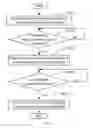
FIG. 1 is a flowchart of a method for processing documents on a touch screen implemented by a central processing unit (CPU) in accordance with one embodiment.
FIG. 2 is a schematic diagram showing a window when documents are processed on a touch screen in accordance with one embodiment.
DETAILED DESCRIPTION
FIG. 1 is a flowchart of a method for processing documents on a touch screen 20 (shown in FIG. 2) implemented by a CPU 10 (shown in FIG. 2) executing one or more programs stored in a storage system 30 (shown in FIG. 2) of an electronic device 1 (shown in FIG. 2) in accordance with one embodiment. FIG. 2 is a schematic diagram showing a window when documents are processed on a touch screen 20 in accordance with one embodiment. FIG. 2 will be described together with FIG. 1 in the following disclosure.
In step S110, The CPU 10 of the electronic device 1 detects operations from users via input devices of the electronic device 1. Therein, the input devices may be a mouse, a touch pen, a combination of the mouse and the touch pen, or a finger.
In step S120, the CPU 10 detects whether an object in a document is chosen by the received operation; if not, the method returns to step S110. The chosen object in the document may be: words, images, links, and so on, or a combination thereof. As shown in FIG. 2, the chosen object is a word “involves.” When an object is chosen, it may be highlighted in any of many different ways, such as framed in a box in this example.
In step S130, if an object in a document is chosen by the operation, the CPU 10 pops up on the touch screen 20, a menu including many menu options for the chosen object on the touch screen 20. The menu corresponds to one or more programs stored in the storage system 30. As shown in FIG. 2, the menu options in this example include cut, copy, and cancel. For other types of objects and in other embodiments, the menu can include additional or different menu options, such as, insert, send, go to, and so on.
In step S140, the CPU 10 detects whether a selection operation is selected by the users; if not, the method returns to step S130.
In step S160, if a selection operation is selected, the CPU 10 performs an operation on the highlighted object according to the selection operation. As shown in FIG. 2, if the selection operation is cut, the CPU 10 will cut the chosen object “involves,” and save the cut object to a system clipboard. If the selection operation is copy, the CPU 10 will copy the chosen object “involves,” and save the copied object to the system clipboard. If the selection operation is cancel, the menu will disappear and the highlighted object is no longer highlighted so another object can be selected.
Although the present disclosure has been specifically described on the basis of the embodiments thereof, the disclosure is not to be construed as being limited thereto. Various changes or modifications may be made to the embodiments without departing from the scope and spirit of the disclosure.
Claims
What is claimed is:1. A computer-implemented method for processing a document, in an electronic device, the method comprising:
providing the electronic device, the electronic device comprising a touch screen, a central processing unit (CPU), a storage system comprising one or more programs to be executed by the CPU;
displaying the document on the touch screen;
detecting whether an object in a document is chosen by an operation;
popping up a menu corresponding to the one or more programs, if an object in the document is chosen by the received operation, the menu including menu options for the chosen object on the touch screen;
detecting whether a selection operation is selected;
performing an operation on the highlighted object according to the selection operation if a selection operation is selected.
2. The method as described in claim 1, further comprising highlighting an object when an object is chosen.
3. The method as described in claim 1, further comprising saving the chosen object to a system clipboard after a corresponding operation is performed for the chosen object.
4. The method as described in claim 1, wherein the chosen object in the document is selected from the group consisting of words, images, links, and a combination thereof.
5. The method as described in claim 1, wherein the input devices is selected from the group consisting of a mouse, a touch pen, and a combination of the mouse and the touch pen.
6. The method as described in claim 1, wherein the menu options comprises cut, copy, and cancel.
Images & Drawings included:


Sources:
- United States Patent and Trademark Office - verify current appl. status at the USPTO↗
Recent applications in this class:
- » 20250173501 2025-05-29
METHOD AND APPARATUS FOR PROCESSING TEXT, ELECTRONIC DEVICE, AND STORAGE MEDIUM - » 20250173500 2025-05-29
METHODS, APPARATUSES AND COMPUTER PROGRAM PRODUCTS FOR CONTEXTUALLY AWARE DEBIASING - » 20250165702 2025-05-22
INFORMATION PROCESSING DEVICE, COMPUTER-READABLE MEDIUM, AND INFORMATION PROCESSING METHOD - » 20250165701 2025-05-22
INFORMATION PROCESSING APPARATUS, INFORMATION PROCESSING METHOD, AND NON-TRANSITORY COMPUTER READABLE STORAGE MEDIUM - » 20250165700 2025-05-22
METHOD AND DEVICE FOR OUTPUTTING INSURANCE OUTBOUND CONVERSATION INFORMATION BASED ON GENERATIVE LARGE LANGUAGE MODEL - » 20250165699 2025-05-22
METHOD AND APPARATUS OF GENERATING MEETING SUMMARY, ELECTRONIC DEVICE AND READABLE STORAGE MEDIUM - » 20250165698 2025-05-22
CONTENT MANAGEMENT TOOL FOR CAPTURING AND GENERATIVELY TRANSFORMING CONTENT ITEM - » 20250165697 2025-05-22
GUIDED PROMPT CREATION VIA FOUNDATION MODEL INTEGRATIONS IN APPLICATION ENVIRONMENTS - » 20250165696 2025-05-22
INTEGRATED TWO-FRAME EBOOK/MEDIA PLATFORM - » 20250156628 2025-05-15
SYSTEMS AND METHODS FOR SYNCHRONIZING GRAPHICAL DISPLAYS ACROSS DEVICES
Recent applications for this Assignee:
- » 20140233961 2014-08-21
Optical communication module including optical-electrical signal converters and optical signal generators - » 20140083669 2014-03-27
HEAT SINK - » 20140083669 2014-03-27
HEAT SINK - » 20140063746 2014-03-06
Electronic device with heat dissipation assembly - » 20140061224 2014-03-06
AUTOMATIC VENDING MACHINE - » 20140060914 2014-03-06
Enclosure with shield apparatus - » 20140058727 2014-02-27
MULTIMEDIA RECORDING SYSTEM AND METHOD - » 20140055955 2014-02-27
Fastener - » 20140055322 2014-02-27
DISPLAY SYSTEM AND HEAD-MOUNTED DISPLAY APPARATUS - » 20140054439 2014-02-27
CONTAINER DATA CENTER WITH SUPPORTING APPARATUS