HOST CONTROLLABLE POP-UP SOFT KEYPADS
US20160179369A1
2016-06-23
14/959,863
2015-12-04
Abstract:
A method of controlling a soft keypad in a networked computer environment comprises establishing an electronic communication between a remote client on an electronic device and a host computer. The electronic device has a touch interface. The electronic communication requires keypad input. The host computer sends a command to the remote client to display a predefined keypad stored on the electronic device. The predefined keypad includes a set of keys necessary for valid keypad input for the electronic communication.
Interested in similar patents?
Get notified when new applications in this technology area are published.
Classification:
G06F3/04886 » CPC main
Input arrangements for transferring data to be processed into a form capable of being handled by the computer; Output arrangements for transferring data from processing unit to output unit, e.g. interface arrangements; Input arrangements or combined input and output arrangements for interaction between user and computer; Interaction techniques based on graphical user interfaces [GUI] using specific features provided by the input device, e.g. functions controlled by the rotation of a mouse with dual sensing arrangements, or of the nature of the input device, e.g. tap gestures based on pressure sensed by a digitiser using a touch-screen or digitiser, e.g. input of commands through traced gestures by partitioning the display area of the touch-screen or the surface of the digitising tablet into independently controllable areas, e.g. virtual keyboards or menus
G06F3/04883 » CPC further
Input arrangements for transferring data to be processed into a form capable of being handled by the computer; Output arrangements for transferring data from processing unit to output unit, e.g. interface arrangements; Input arrangements or combined input and output arrangements for interaction between user and computer; Interaction techniques based on graphical user interfaces [GUI] using specific features provided by the input device, e.g. functions controlled by the rotation of a mouse with dual sensing arrangements, or of the nature of the input device, e.g. tap gestures based on pressure sensed by a digitiser using a touch-screen or digitiser, e.g. input of commands through traced gestures for inputting data by handwriting, e.g. gesture or text
H04L67/02 » CPC further
Network arrangements or protocols for supporting network services or applications; Protocols based on web technology, e.g. hypertext transfer protocol [HTTP]
G06F2203/04803 » CPC further
Indexing scheme relating to -; Indexing scheme relating to Split screen, i.e. subdividing the display area or the window area into separate subareas
G06F3/0488 IPC
Input arrangements for transferring data to be processed into a form capable of being handled by the computer; Output arrangements for transferring data from processing unit to output unit, e.g. interface arrangements; Input arrangements or combined input and output arrangements for interaction between user and computer; Interaction techniques based on graphical user interfaces [GUI] using specific features provided by the input device, e.g. functions controlled by the rotation of a mouse with dual sensing arrangements, or of the nature of the input device, e.g. tap gestures based on pressure sensed by a digitiser using a touch-screen or digitiser, e.g. input of commands through traced gestures
G06F3/0482 » CPC further
Input arrangements for transferring data to be processed into a form capable of being handled by the computer; Output arrangements for transferring data from processing unit to output unit, e.g. interface arrangements; Input arrangements or combined input and output arrangements for interaction between user and computer; Interaction techniques based on graphical user interfaces [GUI] based on specific properties of the displayed interaction object or a metaphor-based environment, e.g. interaction with desktop elements like windows or icons, or assisted by a cursor's changing behaviour or appearance Interaction with lists of selectable items, e.g. menus
Description
CROSS-REFERENCE TO RELATED APPLICATION
The present application claims the benefit of U.S. Patent Application No. 62/094,344 for Host Controllable Pop-Up Soft Keypads filed Dec. 19, 2014, which is hereby incorporated by reference in its entirety.
FIELD OF THE INVENTION
The invention is generally related to software keypads for electronic devices having touch panels, and, more particularly, to host controllable pop-up soft keypads for electronic devices having touch panels.
BACKGROUND
Historically, portable data collection devices include true, physical keypads for data entry. Keypads are often customized for the specific application, and durability, as well as ease of use, are of key importance to the user. Newer portable data collection devices include touch screens that lack physical keypads. Customers who want to do manual data entry must rely on software-based popup keypads to substitute for the traditional true keypad. Popup keypads are advantageous in that they can be customized to the data being entered. If a software application has been written to run locally on the device, it can automatically pop up the keypads as appropriate. If however, the device is running a terminal emulator or a browser (instead of specific software), this type of automatic control is not possible at the portable device. These implementations rely on the user to manually call up the keypad as needed. Therefore, a system and method where a host computer is able to automatically call a pop-up keypad in a portable electronic device would be desirable.
SUMMARY
In an aspect of the invention, a method of controlling a soft keypad in a networked computer environment comprises: establishing an electronic communication between a remote client on an electronic device and a host computer, the electronic device having a touch interface, the electronic communication requiring keypad input; and sending a command from the host computer to the remote client to display a predefined keypad wherein the predefined keypad includes a set of keys that are valid as keypad input for the electronic communication.
In an embodiment, the electronic device is a portable data terminal.
In an embodiment, the remote client is terminal emulation software.
In an embodiment, the electronic communication is established through Telnet protocol.
In another embodiment, the remote client is web browsing software.
In another embodiment, the electronic communication is established through hypertext transfer protocol.
In an embodiment, the predefined keypad is stored on the electronic device.
In another embodiment, the electronic device includes a plurality of predefined keypads.
In yet another embodiment, the set of keys of the predefined keypad includes numeric keys only.
In yet another embodiment, the set of keys of the predefined keyboard includes all alphanumeric keys.
In yet another embodiment, the set of keys of the predefined keyboard includes function keys.
In an embodiment, the dimensions of each key of the predefined keypad are sized and dimensioned to fit on the touch interface.
In an embodiment, the dimensions of each key of the predefined keypad are sized and dimensioned to fit on the touch interface, dynamically.
In another aspect of the invention, a method of controlling a soft keypad in a networked computer environment comprises: providing a host computer; providing an electronic device having a touch interface, a plurality of predefined soft keypads stored in a memory device, and a remote client for communicating with said host computer; establishing an electronic communication between said remote client on said electronic device and said host computer, the electronic communication requiring keypad input; and providing a software application on said host computer which is operative for sending a command from the host computer to the remote client to display a predefined keypad, wherein the predefined keypad includes a set of keys that are valid as keypad input for the electronic communication.
In an embodiment, the electronic device includes a plurality of predefined keypads.
In another embodiment, the set of keys of the predefined keypad includes numeric keys only.
In another embodiment, the set of keys of the predefined keyboard includes all alphanumeric keys.
In yet another embodiment, the set of keys of the predefined keyboard includes function keys.
In another embodiment, the dimensions of each key of the predefined keypad are sized and dimensioned to fit on the touch interface.
In another embodiment, the dimensions of each key of the predefined keypad are sized and dimensioned to fit on the touch interface, dynamically.
BRIEF DESCRIPTION OF THE DRAWINGS
The invention will now be discussed by way of example, with reference to the accompanying Figures, of which:
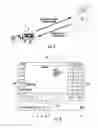
FIG. 1 is a partial perspective view of a user-worn electronic device with a touch screen having a remote client with a host controlled pop-up soft keypad thereon;
FIG. 2 is a perspective view of the user with the electronic device in an inventory control or logistics control application;
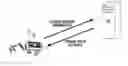
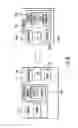
FIG. 3 is an illustration of an electronic device establishing an electronic communication with a host computer and the host computer invoking a pop-up soft keypad on the electronic device;
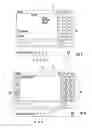
FIG. 4 is a plan view of the touch screen with a host controlled pop-up keypad having a subset of function keys;
FIG. 5 is a plan view of the touch screen with a host controlled pop-up keypad having an alternative subset of function keys;
FIG. 6 is a plan view of the touch screen with a host controlled pop-up keypad having a subset of function and numeric keys;
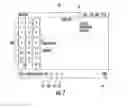
FIG. 7 is a plan view of the touch screen with a host controlled pop-up keypad having a subset of numeric keys;
FIG. 8 is a block diagram of an electronic device and host computer in electronic communication;
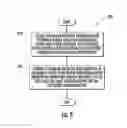
FIG. 9 is a flow chart of a method for the electronic device establishing an electronic communication with a host computer and the host computer invoking a pop-up soft keypad on the electronic device; and
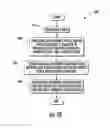
FIG. 10 is a flow chart of a method of providing an electronic device and host computer configured to establish an electronic communication where the host computer is configured to invoke a pop-up soft keypad on the electronic device.
DETAILED DESCRIPTION
Generally, a method of controlling a soft keypad in a networked computer environment is disclosed. The method includes establishing an electronic communication between a remote client on an electronic device and a host computer. The electronic device has a touch interface and the electronic communication requires keypad input. The host computer sends a command to the remote client to display a predefined keypad stored on the electronic device. The predefined keypad includes a set of keys necessary for valid keypad input for the electronic communication, such as numeric, functions keys, and alpha numeric keys.
Referring to FIGS. 1, 2 and 8, a user 10 is shown wearing a portable electronic device 12 on the user's wrist. In addition to a barcode scanner 14, shown on the user's finger, the portable electronic device 12 includes a touch screen user interface (or “touch screen”) 16 for input. The portable electronic device 12 also generally includes a processor 12a, memory 12b, storage 12c (such as flash memory), and input/output controller 100d (such as wireless radios). An operating system software runs in the memory 12b and may be stored in the memory 12b or optionally embedded in, for example, a ROM. A remote client runs in the memory 12b and is configured to establish communication with, and then interact with, the host computer 100. These portable electronic devices 12 are often used in inventory and logistics control in warehouses or depots and other industries where a large number of items must be tracked; however, these devices 12 have many other uses and the disclosure herein is not limited to the same, but merely provided for context. The exemplary embodiment may be used in any electronic device 12 having a touch screen that communicates with a host computer 100 via a remote client. The exemplary embodiment permits the host computer 100 to invoke pop-up soft keypads on the electronic device 12 based on the procedure occurring on the electronic device 12.
The host computer 100 also includes a processor 100a, memory 100b, storage 100c, and input/output controller 100d (which may be wireless). An operating system runs in the memory 100b of the host computer 100. The host computer 100 further includes a host computer program, which the user operating a portable electronic device 12 may need access to, from time to time, as the case may be.
Because these devices 12 lack true keypads with physical keys, the user must enter data through a pop-up software keypad. Popup keypads are advantageous in that they can be customized to the data being entered. If an application has been written to run locally on the device 12, it can automatically pop up the keypads as appropriate and display an appropriate set of keys. If however, the device 12 is running a terminal emulator or a browser (rather than a specific application), the emulator or browser is not specific to a task and cannot control the popup keypads. These implementations rely on the user to manually call up the necessary keypad.
Referring to FIGS. 3, 9 and 10, a method provides a modified remote client software (terminal emulator or browser) for establishing an electronic communication with a host computer 100. The remote client software permits the host computer 100 to automatically invoke a keypad on the electronic device 12. The remote client could be a Telnet/ANSI terminal emulation program for establishing a telnet protocol communication with the host computer 100, or a web browsing software for establishing a hypertext transfer protocol communication with a host computer 100. Other remote clients implementing other communication protocols may be used as well. In either case, the remote client includes specific code and commands that allow the host computer 100 to pop up keypads on the electronic device 12 remotely. Although the remote client is described as software, it is important to note that the remote client may be firmware embedded in the electronic device 12. The method described herein may further be encoded in any program language and configured to run on any operating system.
In an exemplary embodiment, a set of predefined keypads is stored on the electronic device 12. The host computer 100 runs an application that communicates with the device 12 and can send a command to the remote client on the electronic device 12 to pop up one of the predefined keypads responsive to pre-established input criteria. This feature is a great benefit to the user, because the host computer 100 program is aware of the task that is being done and can pop up the needed keypad appropriate for that task. For example, if the user is entering a password, the user will need a full alphanumeric keypad that includes many keys that may have to be very small. However, if the user is at a data collection screen and is being asked to input a quantity, the host computer 100 can pop up a numeric only keypad that shows only a few keys that can be larger.
In the embodiment shown in FIG. 9, a method 200 includes establishing an electronic communication between a remote client on an electronic device 12 and a host computer 100, the electronic device 12 having a touch interface, the electronic communication requiring keypad input at block 210; and sending a command from the host computer 100 to the remote client to display a predefined keypad wherein the predefined keypad includes a set of keys that are valid as keypad input for the electronic communication at block 220.
In the embodiment shown in FIG. 10, a method 300 includes providing a host 100 at block 310; providing an electronic device 12 having a touch interface, a plurality of predefined soft keypads stored in a memory device 12c, and a remote client at block 320; establishing an electronic communication between said remote client on said electronic device 12 and said host computer 100 at block 330; and providing a software application on said host computer 100 which is operative for sending a command from the host computer 100 at block 340.
These predefined keypads are fully customizable for the input needed (or allowed) by the host computer 100. For instance, referring to FIG. 4, a host controlled pop-up soft keypad 20 having a first portion, second portion and third portion 20a, 20b, 20c is shown overlaying a remote client 22. The keypad 20 includes a set of function keys (F1-F10, left cursor, right cursor, space and enter) in a first portion 20a displayed in the grid pattern on the right side of the touch screen 16. Special operations keys, such as escape (ESC), tab, alt and shift may be displayed in a second portion 20b to the left side of the touch screen 16. Additional function keys such as P1, P2, P3 and color coded keys, such as a green key, orange key and blue key may also be included in a third portion 20c that have tailored input for the host computer 100.
Referring to FIG. 5, a host controlled 100 pop-up soft keypad 20 in a first portion 20a is shown overlaying a remote client 22. The keypad includes a set of function keys (F1-F10, left cursor, right cursor, space and enter) in a first portion 20a displayed in the grid pattern on the right side of the touch screen.
Referring to FIG. 6, a host controlled pop-up soft keypad 20 is shown overlaying a remote client 22. The keypad 20 includes a set of numeric keys (1-10, left cursor, right cursor, space and enter) in a first portion 20a displayed in the grid pattern on the right side of the touch screen. Further the numeric keypad may further include additional indicia indicating alternate input from key combinations, such as shift and alt, for instance. Special operations keys, such as escape (ESC), tab, control (CTRL), and shift may be displayed in a second portion 20b to the left side of the touch screen 16. Additional function keys such as P1, P2, P3 and color coded keys, such as a green key, orange key and blue key may also be included in a third portion 20c at a bottom side of the touch screen 16 that have tailored input for the host computer 100.
Referring to FIG. 7, a host controlled pop-up soft keypad 20 is shown overlaying a remote client 22. The keypad 20 includes a set of numeric keys (1-10, space (spc), delete, alt and enter) in a first portion 20a displayed in the grid pattern on the left side of the touch screen 16.
It is to be understood the exemplary keypads 20 shown in FIGS. 4-7 and described above may include other keys as needed by the host computer 100 program. The keypad 20 layout and arrangement may be customized. The user may store a preference for having a numeric keypad, for example, appear in various portions 20a, 20b, 20c of the touch screen as desired. The user may prefer some function keys appear at a top side of the touch screen 16 versus the bottom side in yet a fourth portion. Further, the size and dimensions of the keys may be fixed or dynamic, sizing the width and height of the keys to show more of the remote client 22 or less as desired and based on the dimensions of the touch screen 16.
The various portions 20a, 20b, 20c of the keypad 20 may be selectively hidden and rotated by the user as well to allow more of the touch screen 16 to be seen by the user or position the screen optimally for the user if the user is left handed versus right handed, for example. In particular, use of a “select” key 26, permits the user to select a desired portion 20a, 20b, 20c of the keypad 20 and then hide it via a view key 28 or rotate it via a rotate key 30.
Although the host controlled keypad is invoked automatically, the user may nevertheless override the host controlled keypad and invoke a full alpha-numeric keypad via the keyboard icon 24. The user may further access additional functions of the electronic device 12 by selecting a menu key 32 without exiting or otherwise disturbing the remote client 22 and keypad 20.
For these reasons, the method of controlling a soft keypad in a networked computer environment is believed to represent significant advancements in the art, which have substantial commercial merit. In particular, the ability of the host computer to invoke keypads having discrete set of keys related to the input needed permits the user to focus on the task rather than operation of the electronic device 12, thereby permitting the user to be more efficient. Further, the small dimensions of the touch screen of portable electronic devices is used more efficiently as it permits more screen to be used for the task and as unneeded keys are never displayed.
While there is shown and described herein certain specific structure embodying the disclosure, it will be manifest to those skilled in the art that various modifications and rearrangements of the parts may be made without departing from the spirit and scope of the underlying concept and that the same is not limited to the particular forms herein shown and described except insofar as indicated by the scope of the appended claim.
To supplement the present disclosure, this application incorporates entirely by reference the following patents, patent application publications, and patent applications:
- U.S. Pat. No. 6,832,725; U.S. Pat. No. 7,128,266;
- U.S. Pat. No. 7,159,783; U.S. Pat. No. 7,413,127;
- U.S. Pat. No. 7,726,575; U.S. Pat. No. 8,294,969;
- U.S. Pat. No. 8,317,105; U.S. Pat. No. 8,322,622;
- U.S. Pat. No. 8,366,005; U.S. Pat. No. 8,371,507;
- U.S. Pat. No. 8,376,233; U.S. Pat. No. 8,381,979;
- U.S. Pat. No. 8,390,909; U.S. Pat. No. 8,408,464;
- U.S. Pat. No. 8,408,468; U.S. Pat. No. 8,408,469;
- U.S. Pat. No. 8,424,768; U.S. Pat. No. 8,448,863;
- U.S. Pat. No. 8,457,013; U.S. Pat. No. 8,459,557;
- U.S. Pat. No. 8,469,272; U.S. Pat. No. 8,474,712;
- U.S. Pat. No. 8,479,992; U.S. Pat. No. 8,490,877;
- U.S. Pat. No. 8,517,271; U.S. Pat. No. 8,523,076;
- U.S. Pat. No. 8,528,818; U.S. Pat. No. 8,544,737;
- U.S. Pat. No. 8,548,242; U.S. Pat. No. 8,548,420;
- U.S. Pat. No. 8,550,335; U.S. Pat. No. 8,550,354;
- U.S. Pat. No. 8,550,357; U.S. Pat. No. 8,556,174;
- U.S. Pat. No. 8,556,176; U.S. Pat. No. 8,556,177;
- U.S. Pat. No. 8,559,767; U.S. Pat. No. 8,599,957;
- U.S. Pat. No. 8,561,895; U.S. Pat. No. 8,561,903;
- U.S. Pat. No. 8,561,905; U.S. Pat. No. 8,565,107;
- U.S. Pat. No. 8,571,307; U.S. Pat. No. 8,579,200;
- U.S. Pat. No. 8,583,924; U.S. Pat. No. 8,584,945;
- U.S. Pat. No. 8,587,595; U.S. Pat. No. 8,587,697;
- U.S. Pat. No. 8,588,869; U.S. Pat. No. 8,590,789;
- U.S. Pat. No. 8,596,539; U.S. Pat. No. 8,596,542;
- U.S. Pat. No. 8,596,543; U.S. Pat. No. 8,599,271;
- U.S. Pat. No. 8,599,957; U.S. Pat. No. 8,600,158;
- U.S. Pat. No. 8,600,167; U.S. Pat. No. 8,602,309;
- U.S. Pat. No. 8,608,053; U.S. Pat. No. 8,608,071;
- U.S. Pat. No. 8,611,309; U.S. Pat. No. 8,615,487;
- U.S. Pat. No. 8,616,454; U.S. Pat. No. 8,621,123;
- U.S. Pat. No. 8,622,303; U.S. Pat. No. 8,628,013;
- U.S. Pat. No. 8,628,015; U.S. Pat. No. 8,628,016;
- U.S. Pat. No. 8,629,926; U.S. Pat. No. 8,630,491;
- U.S. Pat. No. 8,635,309; U.S. Pat. No. 8,636,200;
- U.S. Pat. No. 8,636,212; U.S. Pat. No. 8,636,215;
- U.S. Pat. No. 8,636,224; U.S. Pat. No. 8,638,806;
- U.S. Pat. No. 8,640,958; U.S. Pat. No. 8,640,960;
- U.S. Pat. No. 8,643,717; U.S. Pat. No. 8,646,692;
- U.S. Pat. No. 8,646,694; U.S. Pat. No. 8,657,200;
- U.S. Pat. No. 8,659,397; U.S. Pat. No. 8,668,149;
- U.S. Pat. No. 8,678,285; U.S. Pat. No. 8,678,286;
- U.S. Pat. No. 8,682,077; U.S. Pat. No. 8,687,282;
- U.S. Pat. No. 8,692,927; U.S. Pat. No. 8,695,880;
- U.S. Pat. No. 8,698,949; U.S. Pat. No. 8,717,494;
- U.S. Pat. No. 8,717,494; U.S. Pat. No. 8,720,783;
- U.S. Pat. No. 8,723,804; U.S. Pat. No. 8,723,904;
- U.S. Pat. No. 8,727,223; U.S. Pat. No. D702,237;
- U.S. Pat. No. 8,740,082; U.S. Pat. No. 8,740,085;
- U.S. Pat. No. 8,746,563; U.S. Pat. No. 8,750,445;
- U.S. Pat. No. 8,752,766; U.S. Pat. No. 8,756,059;
- U.S. Pat. No. 8,757,495; U.S. Pat. No. 8,760,563;
- U.S. Pat. No. 8,763,909; U.S. Pat. No. 8,777,108;
- U.S. Pat. No. 8,777,109; U.S. Pat. No. 8,779,898;
- U.S. Pat. No. 8,781,520; U.S. Pat. No. 8,783,573;
- U.S. Pat. No. 8,789,757; U.S. Pat. No. 8,789,758;
- U.S. Pat. No. 8,789,759; U.S. Pat. No. 8,794,520;
- U.S. Pat. No. 8,794,522; U.S. Pat. No. 8,794,525;
- U.S. Pat. No. 8,794,526; U.S. Pat. No. 8,798,367;
- U.S. Pat. No. 8,807,431; U.S. Pat. No. 8,807,432;
- U.S. Pat. No. 8,820,630; U.S. Pat. No. 8,822,848;
- U.S. Pat. No. 8,824,692; U.S. Pat. No. 8,824,696;
- U.S. Pat. No. 8,842,849; U.S. Pat. No. 8,844,822;
- U.S. Pat. No. 8,844,823; U.S. Pat. No. 8,849,019;
- U.S. Pat. No. 8,851,383; U.S. Pat. No. 8,854,633;
- U.S. Pat. No. 8,866,963; U.S. Pat. No. 8,868,421;
- U.S. Pat. No. 8,868,519; U.S. Pat. No. 8,868,802;
- U.S. Pat. No. 8,868,803; U.S. Pat. No. 8,870,074;
- U.S. Pat. No. 8,879,639; U.S. Pat. No. 8,880,426;
- U.S. Pat. No. 8,881,983; U.S. Pat. No. 8,881,987;
- U.S. Pat. No. 8,903,172; U.S. Pat. No. 8,908,995;
- U.S. Pat. No. 8,910,870; U.S. Pat. No. 8,910,875;
- U.S. Pat. No. 8,914,290; U.S. Pat. No. 8,914,788;
- U.S. Pat. No. 8,915,439; U.S. Pat. No. 8,915,444;
- U.S. Pat. No. 8,916,789; U.S. Pat. No. 8,918,250;
- U.S. Pat. No. 8,918,564; U.S. Pat. No. 8,925,818;
- U.S. Pat. No. 8,939,374; U.S. Pat. No. 8,942,480;
- U.S. Pat. No. 8,944,313; U.S. Pat. No. 8,944,327;
- U.S. Pat. No. 8,944,332; U.S. Pat. No. 8,950,678;
- U.S. Pat. No. 8,967,468; U.S. Pat. No. 8,971,346;
- U.S. Pat. No. 8,976,030; U.S. Pat. No. 8,976,368;
- U.S. Pat. No. 8,978,981; U.S. Pat. No. 8,978,983;
- U.S. Pat. No. 8,978,984; U.S. Pat. No. 8,985,456;
- U.S. Pat. No. 8,985,457; U.S. Pat. No. 8,985,459;
- U.S. Pat. No. 8,985,461; U.S. Pat. No. 8,988,578;
- U.S. Pat. No. 8,988,590; U.S. Pat. No. 8,991,704;
- U.S. Pat. No. 8,996,194; U.S. Pat. No. 8,996,384;
- U.S. Pat. No. 9,002,641; U.S. Pat. No. 9,007,368;
- U.S. Pat. No. 9,010,641; U.S. Pat. No. 9,015,513;
- U.S. Pat. No. 9,016,576; U.S. Pat. No. 9,022,288;
- U.S. Pat. No. 9,030,964; U.S. Pat. No. 9,033,240;
- U.S. Pat. No. 9,033,242; U.S. Pat. No. 9,036,054;
- U.S. Pat. No. 9,037,344; U.S. Pat. No. 9,038,911;
- U.S. Pat. No. 9,038,915; U.S. Pat. No. 9,047,098;
- U.S. Pat. No. 9,047,359; U.S. Pat. No. 9,047,420;
- U.S. Pat. No. 9,047,525; U.S. Pat. No. 9,047,531;
- U.S. Pat. No. 9,053,055; U.S. Pat. No. 9,053,378;
- U.S. Pat. No. 9,053,380; U.S. Pat. No. 9,058,526;
- U.S. Pat. No. 9,064,165; U.S. Pat. No. 9,064,167;
- U.S. Pat. No. 9,064,168; U.S. Pat. No. 9,064,254;
- U.S. Pat. No. 9,066,032; U.S. Pat. No. 9,070,032;
- U.S. Design Pat. No. D716,285;
- U.S. Design Pat. No. D723,560;
- U.S. Design Pat. No. D730,357;
- U.S. Design Pat. No. D730,901;
- U.S. Design Pat. No. D730,902;
- U.S. Design Pat. No. D733,112;
- U.S. Design Pat. No. D734,339;
- International Publication No. 2013/163789;
- International Publication No. 2013/173985;
- International Publication No. 2014/019130;
- International Publication No. 2014/110495;
- U.S. Patent Application Publication No. 2008/0185432;
- U.S. Patent Application Publication No. 2009/0134221;
- U.S. Patent Application Publication No. 2010/0177080;
- U.S. Patent Application Publication No. 2010/0177076;
- U.S. Patent Application Publication No. 2010/0177707;
- U.S. Patent Application Publication No. 2010/0177749;
- U.S. Patent Application Publication No. 2010/0265880;
- U.S. Patent Application Publication No. 2011/0202554;
- U.S. Patent Application Publication No. 2012/0111946;
- U.S. Patent Application Publication No. 2012/0168511;
- U.S. Patent Application Publication No. 2012/0168512;
- U.S. Patent Application Publication No. 2012/0193423;
- U.S. Patent Application Publication No. 2012/0203647;
- U.S. Patent Application Publication No. 2012/0223141;
- U.S. Patent Application Publication No. 2012/0228382;
- U.S. Patent Application Publication No. 2012/0248188;
- U.S. Patent Application Publication No. 2013/0043312;
- U.S. Patent Application Publication No. 2013/0082104;
- U.S. Patent Application Publication No. 2013/0175341;
- U.S. Patent Application Publication No. 2013/0175343;
- U.S. Patent Application Publication No. 2013/0257744;
- U.S. Patent Application Publication No. 2013/0257759;
- U.S. Patent Application Publication No. 2013/0270346;
- U.S. Patent Application Publication No. 2013/0287258;
- U.S. Patent Application Publication No. 2013/0292475;
- U.S. Patent Application Publication No. 2013/0292477;
- U.S. Patent Application Publication No. 2013/0293539;
- U.S. Patent Application Publication No. 2013/0293540;
- U.S. Patent Application Publication No. 2013/0306728;
- U.S. Patent Application Publication No. 2013/0306731;
- U.S. Patent Application Publication No. 2013/0307964;
- U.S. Patent Application Publication No. 2013/0308625;
- U.S. Patent Application Publication No. 2013/0313324;
- U.S. Patent Application Publication No. 2013/0313325;
- U.S. Patent Application Publication No. 2013/0342717;
- U.S. Patent Application Publication No. 2014/0001267;
- U.S. Patent Application Publication No. 2014/0008439;
- U.S. Patent Application Publication No. 2014/0025584;
- U.S. Patent Application Publication No. 2014/0034734;
- U.S. Patent Application Publication No. 2014/0036848;
- U.S. Patent Application Publication No. 2014/0039693;
- U.S. Patent Application Publication No. 2014/0042814;
- U.S. Patent Application Publication No. 2014/0049120;
- U.S. Patent Application Publication No. 2014/0049635;
- U.S. Patent Application Publication No. 2014/0061306;
- U.S. Patent Application Publication No. 2014/0063289;
- U.S. Patent Application Publication No. 2014/0066136;
- U.S. Patent Application Publication No. 2014/0067692;
- U.S. Patent Application Publication No. 2014/0070005;
- U.S. Patent Application Publication No. 2014/0071840;
- U.S. Patent Application Publication No. 2014/0074746;
- U.S. Patent Application Publication No. 2014/0076974;
- U.S. Patent Application Publication No. 2014/0078341;
- U.S. Patent Application Publication No. 2014/0078345;
- U.S. Patent Application Publication No. 2014/0097249;
- U.S. Patent Application Publication No. 2014/0098792;
- U.S. Patent Application Publication No. 2014/0100813;
- U.S. Patent Application Publication No. 2014/0103115;
- U.S. Patent Application Publication No. 2014/0104413;
- U.S. Patent Application Publication No. 2014/0104414;
- U.S. Patent Application Publication No. 2014/0104416;
- U.S. Patent Application Publication No. 2014/0104451;
- U.S. Patent Application Publication No. 2014/0106594;
- U.S. Patent Application Publication No. 2014/0106725;
- U.S. Patent Application Publication No. 2014/0108010;
- U.S. Patent Application Publication No. 2014/0108402;
- U.S. Patent Application Publication No. 2014/0110485;
- U.S. Patent Application Publication No. 2014/0114530;
- U.S. Patent Application Publication No. 2014/0124577;
- U.S. Patent Application Publication No. 2014/0124579;
- U.S. Patent Application Publication No. 2014/0125842;
- U.S. Patent Application Publication No. 2014/0125853;
- U.S. Patent Application Publication No. 2014/0125999;
- U.S. Patent Application Publication No. 2014/0129378;
- U.S. Patent Application Publication No. 2014/0131438;
- U.S. Patent Application Publication No. 2014/0131441;
- U.S. Patent Application Publication No. 2014/0131443;
- U.S. Patent Application Publication No. 2014/0131444;
- U.S. Patent Application Publication No. 2014/0131445;
- U.S. Patent Application Publication No. 2014/0131448;
- U.S. Patent Application Publication No. 2014/0133379;
- U.S. Patent Application Publication No. 2014/0136208;
- U.S. Patent Application Publication No. 2014/0140585;
- U.S. Patent Application Publication No. 2014/0151453;
- U.S. Patent Application Publication No. 2014/0152882;
- U.S. Patent Application Publication No. 2014/0158770;
- U.S. Patent Application Publication No. 2014/0159869;
- U.S. Patent Application Publication No. 2014/0166755;
- U.S. Patent Application Publication No. 2014/0166759;
- U.S. Patent Application Publication No. 2014/0168787;
- U.S. Patent Application Publication No. 2014/0175165;
- U.S. Patent Application Publication No. 2014/0175172;
- U.S. Patent Application Publication No. 2014/0191644;
- U.S. Patent Application Publication No. 2014/0191913;
- U.S. Patent Application Publication No. 2014/0197238;
- U.S. Patent Application Publication No. 2014/0197239;
- U.S. Patent Application Publication No. 2014/0197304;
- U.S. Patent Application Publication No. 2014/0214631;
- U.S. Patent Application Publication No. 2014/0217166;
- U.S. Patent Application Publication No. 2014/0217180;
- U.S. Patent Application Publication No. 2014/0231500;
- U.S. Patent Application Publication No. 2014/0232930;
- U.S. Patent Application Publication No. 2014/0247315;
- U.S. Patent Application Publication No. 2014/0263493;
- U.S. Patent Application Publication No. 2014/0263645;
- U.S. Patent Application Publication No. 2014/0267609;
- U.S. Patent Application Publication No. 2014/0270196;
- U.S. Patent Application Publication No. 2014/0270229;
- U.S. Patent Application Publication No. 2014/0278387;
- U.S. Patent Application Publication No. 2014/0278391;
- U.S. Patent Application Publication No. 2014/0282210;
- U.S. Patent Application Publication No. 2014/0284384;
- U.S. Patent Application Publication No. 2014/0288933;
- U.S. Patent Application Publication No. 2014/0297058;
- U.S. Patent Application Publication No. 2014/0299665;
- U.S. Patent Application Publication No. 2014/0312121;
- U.S. Patent Application Publication No. 2014/0319220;
- U.S. Patent Application Publication No. 2014/0319221;
- U.S. Patent Application Publication No. 2014/0326787;
- U.S. Patent Application Publication No. 2014/0332590;
- U.S. Patent Application Publication No. 2014/0344943;
- U.S. Patent Application Publication No. 2014/0346233;
- U.S. Patent Application Publication No. 2014/0351317;
- U.S. Patent Application Publication No. 2014/0353373;
- U.S. Patent Application Publication No. 2014/0361073;
- U.S. Patent Application Publication No. 2014/0361082;
- U.S. Patent Application Publication No. 2014/0362184;
- U.S. Patent Application Publication No. 2014/0363015;
- U.S. Patent Application Publication No. 2014/0369511;
- U.S. Patent Application Publication No. 2014/0374483;
- U.S. Patent Application Publication No. 2014/0374485;
- U.S. Patent Application Publication No. 2015/0001301;
- U.S. Patent Application Publication No. 2015/0001304;
- U.S. Patent Application Publication No. 2015/0003673;
- U.S. Patent Application Publication No. 2015/0009338;
- U.S. Patent Application Publication No. 2015/0009610;
- U.S. Patent Application Publication No. 2015/0014416;
- U.S. Patent Application Publication No. 2015/0021397;
- U.S. Patent Application Publication No. 2015/0028102;
- U.S. Patent Application Publication No. 2015/0028103;
- U.S. Patent Application Publication No. 2015/0028104;
- U.S. Patent Application Publication No. 2015/0029002;
- U.S. Patent Application Publication No. 2015/0032709;
- U.S. Patent Application Publication No. 2015/0039309;
- U.S. Patent Application Publication No. 2015/0039878;
- U.S. Patent Application Publication No. 2015/0040378;
- U.S. Patent Application Publication No. 2015/0048168;
- U.S. Patent Application Publication No. 2015/0049347;
- U.S. Patent Application Publication No. 2015/0051992;
- U.S. Patent Application Publication No. 2015/0053766;
- U.S. Patent Application Publication No. 2015/0053768;
- U.S. Patent Application Publication No. 2015/0053769;
- U.S. Patent Application Publication No. 2015/0060544;
- U.S. Patent Application Publication No. 2015/0062366;
- U.S. Patent Application Publication No. 2015/0063215;
- U.S. Patent Application Publication No. 2015/0063676;
- U.S. Patent Application Publication No. 2015/0069130;
- U.S. Patent Application Publication No. 2015/0071819;
- U.S. Patent Application Publication No. 2015/0083800;
- U.S. Patent Application Publication No. 2015/0086114;
- U.S. Patent Application Publication No. 2015/0088522;
- U.S. Patent Application Publication No. 2015/0096872;
- U.S. Patent Application Publication No. 2015/0099557;
- U.S. Patent Application Publication No. 2015/0100196;
- U.S. Patent Application Publication No. 2015/0102109;
- U.S. Patent Application Publication No. 2015/0115035;
- U.S. Patent Application Publication No. 2015/0127791;
- U.S. Patent Application Publication No. 2015/0128116;
- U.S. Patent Application Publication No. 2015/0129659;
- U.S. Patent Application Publication No. 2015/0133047;
- U.S. Patent Application Publication No. 2015/0134470;
- U.S. Patent Application Publication No. 2015/0136851;
- U.S. Patent Application Publication No. 2015/0136854;
- U.S. Patent Application Publication No. 2015/0142492;
- U.S. Patent Application Publication No. 2015/0144692;
- U.S. Patent Application Publication No. 2015/0144698;
- U.S. Patent Application Publication No. 2015/0144701;
- U.S. Patent Application Publication No. 2015/0149946;
- U.S. Patent Application Publication No. 2015/0161429;
- U.S. Patent Application Publication No. 2015/0169925;
- U.S. Patent Application Publication No. 2015/0169929;
- U.S. Patent Application Publication No. 2015/0178523;
- U.S. Patent Application Publication No. 2015/0178534;
- U.S. Patent Application Publication No. 2015/0178535;
- U.S. Patent Application Publication No. 2015/0178536;
- U.S. Patent Application Publication No. 2015/0178537;
- U.S. Patent Application Publication No. 2015/0181093;
- U.S. Patent Application Publication No. 2015/0181109;
- U.S. patent application Ser. No. 13/367,978 for a Laser Scanning Module Employing an Elastomeric U-Hinge Based Laser Scanning Assembly, filed Feb. 7, 2012 (Feng et al.);
- U.S. patent application Ser. No. 29/458,405 for an Electronic Device, filed Jun. 19, 2013 (Fitch et al.);
- U.S. patent application Ser. No. 29/459,620 for an Electronic Device Enclosure, filed Jul. 2, 2013 (London et al.);
- U.S. patent application Ser. No. 29/468,118 for an Electronic Device Case, filed Sep. 26, 2013 (Oberpriller et al.);
- U.S. patent application Ser. No. 14/150,393 for Indicia-reader Having Unitary Construction Scanner, filed Jan. 8, 2014 (Colavito et al.);
- U.S. patent application Ser. No. 14/200,405 for Indicia Reader for Size-Limited Applications filed Mar. 7, 2014 (Feng et al.);
- U.S. patent application Ser. No. 14/231,898 for Hand-Mounted Indicia-Reading Device with Finger Motion Triggering filed Apr. 1, 2014 (Van Horn et al.);
- U.S. patent application Ser. No. 29/486,759 for an Imaging Terminal, filed Apr. 2, 2014 (Oberpriller et al.);
- U.S. patent application Ser. No. 14/257,364 for Docking System and Method Using Near Field Communication filed Apr. 21, 2014 (Showering);
- U.S. patent application Ser. No. 14/264,173 for Autofocus Lens System for Indicia Readers filed Apr. 29, 2014 (Ackley et al.);
- U.S. patent application Ser. No. 14/277,337 for MULTIPURPOSE OPTICAL READER, filed May 14, 2014 (Jovanovski et al.);
- U.S. patent application Ser. No. 14/283,282 for TERMINAL HAVING ILLUMINATION AND FOCUS CONTROL filed May 21, 2014 (Liu et al.);
- U.S. patent application Ser. No. 14/327,827 for a MOBILE-PHONE ADAPTER FOR ELECTRONIC TRANSACTIONS, filed Jul. 10, 2014 (Hejl);
- U.S. patent application Ser. No. 14/334,934 for a SYSTEM AND METHOD FOR INDICIA VERIFICATION, filed Jul. 18, 2014 (Hejl);
- U.S. patent application Ser. No. 14/339,708 for LASER SCANNING CODE SYMBOL READING SYSTEM, filed Jul. 24, 2014 (Xian et al.);
- U.S. patent application Ser. No. 14/340,627 for an AXIALLY REINFORCED FLEXIBLE SCAN ELEMENT, filed Jul. 25, 2014 (Rueblinger et al.);
- U.S. patent application Ser. No. 14/446,391 for MULTIFUNCTION POINT OF SALE APPARATUS WITH OPTICAL SIGNATURE CAPTURE filed Jul. 30, 2014 (Good et al.);
- U.S. patent application Ser. No. 14/452,697 for INTERACTIVE INDICIA READER, filed Aug. 6, 2014 (Todeschini);
- U.S. patent application Ser. No. 14/453,019 for DIMENSIONING SYSTEM WITH GUIDED ALIGNMENT, filed Aug. 6, 2014 (Li et al.);
- U.S. patent application Ser. No. 14/462,801 for MOBILE COMPUTING DEVICE WITH DATA COGNITION SOFTWARE, filed on Aug. 19, 2014 (Todeschini et al.);
- U.S. patent application Ser. No. 14/483,056 for VARIABLE DEPTH OF FIELD BARCODE SCANNER filed Sep. 10, 2014 (McCloskey et al.);
- U.S. patent application Ser. No. 14/513,808 for IDENTIFYING INVENTORY ITEMS IN A STORAGE FACILITY filed Oct. 14, 2014 (Singel et al.);
- U.S. patent application Ser. No. 14/519,195 for HANDHELD DIMENSIONING SYSTEM WITH FEEDBACK filed Oct. 21, 2014 (Laffargue et al.);
- U.S. patent application Ser. No. 14/519,179 for DIMENSIONING SYSTEM WITH MULTIPATH INTERFERENCE MITIGATION filed Oct. 21, 2014 (Thuries et al.);
- U.S. patent application Ser. No. 14/519,211 for SYSTEM AND METHOD FOR DIMENSIONING filed Oct. 21, 2014 (Ackley et al.);
- U.S. patent application Ser. No. 14/519,233 for HANDHELD DIMENSIONER WITH DATA-QUALITY INDICATION filed Oct. 21, 2014 (Laffargue et al.);
- U.S. patent application Ser. No. 14/519,249 for HANDHELD DIMENSIONING SYSTEM WITH MEASUREMENT-CONFORMANCE FEEDBACK filed Oct. 21, 2014 (Ackley et al.);
- U.S. patent application Ser. No. 14/527,191 for METHOD AND SYSTEM FOR RECOGNIZING SPEECH USING WILDCARDS IN AN EXPECTED RESPONSE filed Oct. 29, 2014 (Braho et al.);
- U.S. patent application Ser. No. 14/529,563 for ADAPTABLE INTERFACE FOR A MOBILE COMPUTING DEVICE filed Oct. 31, 2014 (Schoon et al.);
- U.S. patent application Ser. No. 14/529,857 for BARCODE READER WITH SECURITY FEATURES filed Oct. 31, 2014 (Todeschini et al.);
- U.S. patent application Ser. No. 14/398,542 for PORTABLE ELECTRONIC DEVICES HAVING A SEPARATE LOCATION TRIGGER UNIT FOR USE IN CONTROLLING AN application UNIT filed Nov. 3, 2014 (Bian et al.);
- U.S. patent application Ser. No. 14/531,154 for DIRECTING AN INSPECTOR THROUGH AN INSPECTION filed Nov. 3, 2014 (Miller et al.);
- U.S. patent application Ser. No. 14/533,319 for BARCODE SCANNING SYSTEM USING WEARABLE DEVICE WITH EMBEDDED CAMERA filed Nov. 5, 2014 (Todeschini);
- U.S. patent application Ser. No. 14/535,764 for CONCATENATED EXPECTED RESPONSES FOR SPEECH RECOGNITION filed Nov. 7, 2014 (Braho et al.);
- U.S. patent application Ser. No. 14/568,305 for AUTO-CONTRAST VIEWFINDER FOR AN INDICIA READER filed Dec. 12, 2014 (Todeschini);
- U.S. patent application Ser. No. 14/573,022 for DYNAMIC DIAGNOSTIC INDICATOR GENERATION filed Dec. 17, 2014 (Goldsmith);
- U.S. patent application Ser. No. 14/578,627 for SAFETY SYSTEM AND METHOD filed Dec. 22, 2014 (Ackley et al.);
- U.S. patent application Ser. No. 14/580,262 for MEDIA GATE FOR THERMAL TRANSFER PRINTERS filed Dec. 23, 2014 (Bowles);
- U.S. patent application Ser. No. 14/590,024 for SHELVING AND PACKAGE LOCATING SYSTEMS FOR DELIVERY VEHICLES filed Jan. 6, 2015 (Payne);
- U.S. patent application Ser. No. 14/596,757 for SYSTEM AND METHOD FOR DETECTING BARCODE PRINTING ERRORS filed Jan. 14, 2015 (Ackley);
- U.S. patent application Ser. No. 14/416,147 for OPTICAL READING APPARATUS HAVING VARIABLE SETTINGS filed Jan. 21, 2015 (Chen et al.);
- U.S. patent application Ser. No. 14/614,706 for DEVICE FOR SUPPORTING AN ELECTRONIC TOOL ON A USER'S HAND filed Feb. 5, 2015 (Oberpriller et al.);
- U.S. patent application Ser. No. 14/614,796 for CARGO APPORTIONMENT TECHNIQUES filed Feb. 5, 2015 (Morton et al.);
- U.S. patent application Ser. No. 29/516,892 for TABLE COMPUTER filed Feb. 6, 2015 (Bidwell et al.);
- U.S. patent application Ser. No. 14/619,093 for METHODS FOR TRAINING A SPEECH RECOGNITION SYSTEM filed Feb. 11, 2015 (Pecorari);
- U.S. patent application Ser. No. 14/628,708 for DEVICE, SYSTEM, AND METHOD FOR DETERMINING THE STATUS OF CHECKOUT LANES filed Feb. 23, 2015 (Todeschini);
- U.S. patent application Ser. No. 14/630,841 for TERMINAL INCLUDING IMAGING ASSEMBLY filed Feb. 25, 2015 (Gomez et al.);
- U.S. patent application Ser. No. 14/635,346 for SYSTEM AND METHOD FOR RELIABLE STORE-AND-FORWARD DATA HANDLING BY ENCODED INFORMATION READING TERMINALS filed Mar. 2, 2015 (Sevier);
- U.S. patent application Ser. No. 29/519,017 for SCANNER filed Mar. 2, 2015 (Zhou et al.);
- U.S. patent application Ser. No. 14/405,278 for DESIGN PATTERN FOR SECURE STORE filed Mar. 9, 2015 (Zhu et al.);
- U.S. patent application Ser. No. 14/660,970 for DECODABLE INDICIA READING TERMINAL WITH COMBINED ILLUMINATION filed Mar. 18, 2015 (Kearney et al.);
- U.S. patent application Ser. No. 14/661,013 for REPROGRAMMING SYSTEM AND METHOD FOR DEVICES INCLUDING PROGRAMMING SYMBOL filed Mar. 18, 2015 (Soule et al.);
- U.S. patent application Ser. No. 14/662,922 for MULTIFUNCTION POINT OF SALE SYSTEM filed Mar. 19, 2015 (Van Horn et al.);
- U.S. patent application Ser. No. 14/663,638 for VEHICLE MOUNT COMPUTER WITH CONFIGURABLE IGNITION SWITCH BEHAVIOR filed Mar. 20, 2015 (Davis et al.);
- U.S. patent application Ser. No. 14/664,063 for METHOD AND APPLICATION FOR SCANNING A BARCODE WITH A SMART DEVICE WHILE CONTINUOUSLY RUNNING AND DISPLAYING AN APPLICATION ON THE SMART DEVICE DISPLAY filed Mar. 20, 2015 (Todeschini);
- U.S. patent application Ser. No. 14/669,280 for TRANSFORMING COMPONENTS OF A WEB PAGE TO VOICE PROMPTS filed Mar. 26, 2015 (Funyak et al.);
- U.S. patent application Ser. No. 14/674,329 for AIMER FOR BARCODE SCANNING filed Mar. 31, 2015 (Bidwell);
- U.S. patent application Ser. No. 14/676,109 for INDICIA READER filed Apr. 1, 2015 (Huck);
- U.S. patent application Ser. No. 14/676,327 for DEVICE MANAGEMENT PROXY FOR SECURE DEVICES filed Apr. 1, 2015 (Yeakley et al.);
- U.S. patent application Ser. No. 14/676,898 for NAVIGATION SYSTEM CONFIGURED TO INTEGRATE MOTION SENSING DEVICE INPUTS filed Apr. 2, 2015 (Showering);
- U.S. patent application Ser. No. 14/679,275 for DIMENSIONING SYSTEM CALIBRATION SYSTEMS AND METHODS filed Apr. 6, 2015 (Laffargue et al.);
- U.S. patent application Ser. No. 29/523,098 for HANDLE FOR A TABLET COMPUTER filed Apr. 7, 2015 (Bidwell et al.);
- U.S. patent application Ser. No. 14/682,615 for SYSTEM AND METHOD FOR POWER MANAGEMENT OF MOBILE DEVICES filed Apr. 9, 2015 (Murawski et al.);
- U.S. patent application Ser. No. 14/686,822 for MULTIPLE PLATFORM SUPPORT SYSTEM AND METHOD filed Apr. 15, 2015 (Qu et al.);
- U.S. patent application Ser. No. 14/687,289 for SYSTEM FOR COMMUNICATION VIA A PERIPHERAL HUB filed Apr. 15, 2015 (Kohtz et al.);
- U.S. patent application Ser. No. 29/524,186 for SCANNER filed Apr. 17, 2015 (Zhou et al.);
- U.S. patent application Ser. No. 14/695,364 for MEDICATION MANAGEMENT SYSTEM filed Apr. 24, 2015 (Sewell et al.);
- U.S. patent application Ser. No. 14/695,923 for SECURE UNATTENDED NETWORK AUTHENTICATION filed Apr. 24, 2015 (Kubler et al.);
- U.S. patent application Ser. No. 29/525,068 for TABLET COMPUTER WITH REMOVABLE SCANNING DEVICE filed Apr. 27, 2015 (Schulte et al.);
- U.S. patent application Ser. No. 14/699,436 for SYMBOL READING SYSTEM HAVING PREDICTIVE DIAGNOSTICS filed Apr. 29, 2015 (Nahill et al.);
- U.S. patent application Ser. No. 14/702,110 for SYSTEM AND METHOD FOR REGULATING BARCODE DATA INJECTION INTO A RUNNING APPLICATION ON A SMART DEVICE filed May 1, 2015 (Todeschini et al.);
- U.S. patent application Ser. No. 14/702,979 for TRACKING BATTERY CONDITIONS filed May 4, 2015 (Young et al.);
- U.S. patent application Ser. No. 14/704,050 for INTERMEDIATE LINEAR POSITIONING filed May 5, 2015 (Charpentier et al.);
- U.S. patent application Ser. No. 14/705,012 for HANDS-FREE HUMAN MACHINE INTERFACE RESPONSIVE TO A DRIVER OF A VEHICLE filed May 6, 2015 (Fitch et al.);
- U.S. patent application Ser. No. 14/705,407 for METHOD AND SYSTEM TO PROTECT SOFTWARE-BASED NETWORK-CONNECTED DEVICES FROM ADVANCED PERSISTENT THREAT filed May 6, 2015 (Hussey et al.);
- U.S. patent application Ser. No. 14/707,037 for SYSTEM AND METHOD FOR DISPLAY OF INFORMATION USING A VEHICLE-MOUNT COMPUTER filed May 8, 2015 (Chamberlin);
- U.S. patent application Ser. No. 14/707,123 for APPLICATION INDEPENDENT DEX/UCS INTERFACE filed May 8, 2015 (Pape);
- U.S. patent application Ser. No. 14/707,492 for METHOD AND APPARATUS FOR READING OPTICAL INDICIA USING A PLURALITY OF DATA SOURCES filed May 8, 2015 (Smith et al.);
- U.S. patent application Ser. No. 14/710,666 for PRE-PAID USAGE SYSTEM FOR ENCODED INFORMATION READING TERMINALS filed May 13, 2015 (Smith);
- U.S. patent application Ser. No. 29/526,918 for CHARGING BASE filed May 14, 2015 (Fitch et al.);
- U.S. patent application Ser. No. 14/715,672 for AUGUMENTED REALITY ENABLED HAZARD DISPLAY filed May 19, 2015 (Venkatesha et al.);
- U.S. patent application Ser. No. 14/715,916 for EVALUATING IMAGE VALUES filed May 19, 2015 (Ackley);
- U.S. patent application Ser. No. 14/722,608 for INTERACTIVE USER INTERFACE FOR CAPTURING A DOCUMENT IN AN IMAGE SIGNAL filed May 27, 2015 (Showering et al.);
- U.S. patent application Ser. No. 29/528,165 for IN-COUNTER BARCODE SCANNER filed May 27, 2015 (Oberpriller et al.);
- U.S. patent application Ser. No. 14/724,134 for ELECTRONIC DEVICE WITH WIRELESS PATH SELECTION CAPABILITY filed May 28, 2015 (Wang et al.);
- U.S. patent application Ser. No. 14/724,849 for METHOD OF PROGRAMMING THE DEFAULT CABLE INTERFACE SOFTWARE IN AN INDICIA READING DEVICE filed May 29, 2015 (Barten);
- U.S. patent application Ser. No. 14/724,908 for IMAGING APPARATUS HAVING IMAGING ASSEMBLY filed May 29, 2015 (Barber et al.);
- U.S. patent application Ser. No. 14/725,352 for APPARATUS AND METHODS FOR MONITORING ONE OR MORE PORTABLE DATA TERMINALS (Caballero et al.);
- U.S. patent application Ser. No. 29/528,590 for ELECTRONIC DEVICE filed May 29, 2015 (Fitch et al.);
- U.S. patent application Ser. No. 29/528,890 for MOBILE COMPUTER HOUSING filed Jun. 2, 2015 (Fitch et al.);
- U.S. patent application Ser. No. 14/728,397 for DEVICE MANAGEMENT USING VIRTUAL INTERFACES CROSS-REFERENCE TO RELATED APPLICATIONS filed Jun. 2, 2015 (Caballero);
- U.S. patent application Ser. No. 14/732,870 for DATA COLLECTION MODULE AND SYSTEM filed Jun. 8, 2015 (Powilleit);
- U.S. patent application Ser. No. 29/529,441 for INDICIA READING DEVICE filed Jun. 8, 2015 (Zhou et al.);
- U.S. patent application Ser. No. 14/735,717 for INDICIA-READING SYSTEMS HAVING AN INTERFACE WITH A USER'S NERVOUS SYSTEM filed Jun. 10, 2015 (Todeschini);
- U.S. patent application Ser. No. 14/738,038 for METHOD OF AND SYSTEM FOR DETECTING OBJECT WEIGHING INTERFERENCES filed Jun. 12, 2015 (Amundsen et al.);
- U.S. patent application Ser. No. 14/740,320 for TACTILE SWITCH FOR A MOBILE ELECTRONIC DEVICE filed Jun. 16, 2015 (Bandringa);
- U.S. patent application Ser. No. 14/740,373 for CALIBRATING A VOLUME DIMENSIONER filed Jun. 16, 2015 (Ackley et al.);
- U.S. patent application Ser. No. 14/742,818 for INDICIA READING SYSTEM EMPLOYING DIGITAL GAIN CONTROL filed Jun. 18, 2015 (Xian et al.);
- U.S. patent application Ser. No. 14/743,257 for WIRELESS MESH POINT PORTABLE DATA TERMINAL filed Jun. 18, 2015 (Wang et al.);
- U.S. patent application Ser. No. 29/530,600 for CYCLONE filed Jun. 18, 2015 (Vargo et al);
- U.S. patent application Ser. No. 14/744,633 for IMAGING APPARATUS COMPRISING IMAGE SENSOR ARRAY HAVING SHARED GLOBAL SHUTTER CIRCUITRY filed Jun. 19, 2015 (Wang);
- U.S. patent application Ser. No. 14/744,836 for CLOUD-BASED SYSTEM FOR READING OF DECODABLE INDICIA filed Jun. 19, 2015 (Todeschini et al.);
- U.S. patent application Ser. No. 14/745,006 for SELECTIVE OUTPUT OF DECODED MESSAGE DATA filed Jun. 19, 2015 (Todeschini et al.);
- U.S. patent application Ser. No. 14/747,197 for OPTICAL PATTERN PROJECTOR filed Jun. 23, 2015 (Thuries et al.);
- U.S. patent application Ser. No. 14/747,490 for DUAL-PROJECTOR THREE-DIMENSIONAL SCANNER filed Jun. 23, 2015 (Jovanovski et al.); and
- U.S. patent application Ser. No. 14/748,446 for CORDLESS INDICIA READER WITH A MULTIFUNCTION COIL FOR WIRELESS CHARGING AND EAS DEACTIVATION, filed Jun. 24, 2015 (Xie et al.).
Claims
What is claimed is:1. A method of controlling a soft keypad in a networked computer environment, comprising:
establishing an electronic communication between a remote client on an electronic device and a host computer, the electronic device having a touch interface, the electronic communication requiring keypad input; and
sending a command from the host computer to the remote client to display a predefined keypad wherein the predefined keypad includes a set of keys that are valid as keypad input for the electronic communication.
2. The method of claim 1, wherein the electronic device is a portable data terminal.
3. The method of claim 1, wherein the remote client is terminal emulation software.
4. The method of claim 3, wherein the electronic communication is established through Telnet protocol.
5. The method of claim 1, wherein the remote client is web browsing software.
6. The method of claim 5, wherein the electronic communication is established through hypertext transfer protocol.
7. The method of claim 1, wherein the predefined keypad is stored on the electronic device.
8. The method of claim 7, wherein the electronic device includes a plurality of predefined keypads.
9. The method of claim 1, wherein the set of keys of the predefined keypad includes numeric keys only.
10. The method of claim 1, wherein the set of keys of the predefined keyboard includes all alphanumeric keys.
11. The method of claim 1, wherein the set of keys of the predefined keyboard includes function keys.
12. The method of claim 1, wherein the dimensions of each key of the predefined keypad are sized and dimensioned to fit on the touch interface.
13. The method of claim 12, wherein the dimensions of each key of the predefined keypad are sized and dimensioned to fit on the touch interface, dynamically.
14. A method of controlling a soft keypad in a networked computer environment, comprising:
providing a host computer;
providing an electronic device having a touch interface, a plurality of predefined soft keypads stored in a memory device, and a remote client for communicating with said host computer;
establishing an electronic communication between said remote client on said electronic device and said host computer, the electronic communication requiring keypad input; and
providing a software application on said host computer which is operative for sending a command from the host computer to the remote client to display a predefined keypad, wherein the predefined keypad includes a set of keys that are valid as keypad input for the electronic communication.
15. The method of claim 14, wherein the electronic device includes a plurality of predefined keypads.
16. The method of claim 14, wherein the set of keys of the predefined keypad includes numeric keys only.
17. The method of claim 14, wherein the set of keys of the predefined keyboard includes all alphanumeric keys.
18. The method of claim 14, wherein the set of keys of the predefined keyboard includes function keys.
19. The method of claim 14, wherein the dimensions of each key of the predefined keypad are sized and dimensioned to fit on the touch interface.
20. The method of claim 19, wherein the dimensions of each key of the predefined keypad are sized and dimensioned to fit on the touch interface, dynamically.
Images & Drawings included:

Sources:
- United States Patent and Trademark Office - verify current appl. status at the USPTO↗
Recent applications in this class:
- » 20250173059 2025-05-29
Predictive Input Interface Having Improved Robustness for Processing Low Precision Inputs - » 20250147657 2025-05-08
METHOD AND APPARATUS FOR DISPLAYING SCREEN BASED ON GESTURE INPUT - » 20250147656 2025-05-08
Methods and Systems for Positioning Animated Images Within a Dynamic Keyboard Interface - » 20250138727 2025-05-01
INTERLEAVED CHARACTER SELECTION INTERFACE - » 20250138726 2025-05-01
An Arrangement and a Method for Providing Text Input in Virtual Reality - » 20250130712 2025-04-24
VIRTUAL INPUT ELEMENT DISPLAY METHOD, ELECTRONIC DEVICE, AND READABLE STORAGE MEDIUM - » 20250123744 2025-04-17
DISPLAY METHOD FOR VIRTUAL KEYBOARD, ELECTRONIC DEVICE AND STORAGE MEDIUM - » 20250110638 2025-04-03
DISPLAY DEVICE AND PRESENTATION DEVICE EQUIPPED WITH SAME - » 20250094042 2025-03-20
IMPLEMENTING USER INTERFACES OF OTHER APPLICATIONS - » 20250094041 2025-03-20
Smart Character Suggestion via XR Cubic Keyboard on Head-mounted Devices